


Custodia per telefono TELESIN per immersioni subacquee
$79.99
$89.99


 Underwater Shooting
 Cycling Shooting
 Fun Shooting
 Daily Creation
 Light and Shadow
 First-person Shooting
 Sports Shooting
 New Arrivals
 Phone Grip
 Fill Light
Neck Phone Holder
Fill Light
Neck Phone Holder
 Fog Machine
 Phone Tripod
 Phone Selfie Stick
 Phone Lens Filters
 Camera Tripod
 Camera Lens Filters
 Camera Bags
 Battery Charger
 Camera Selfie Stick
 Camera Fill Light
 Action Series
 Osmo 360 Series
 Osmo Pocket Series
 X Series
 Ace Pro Series

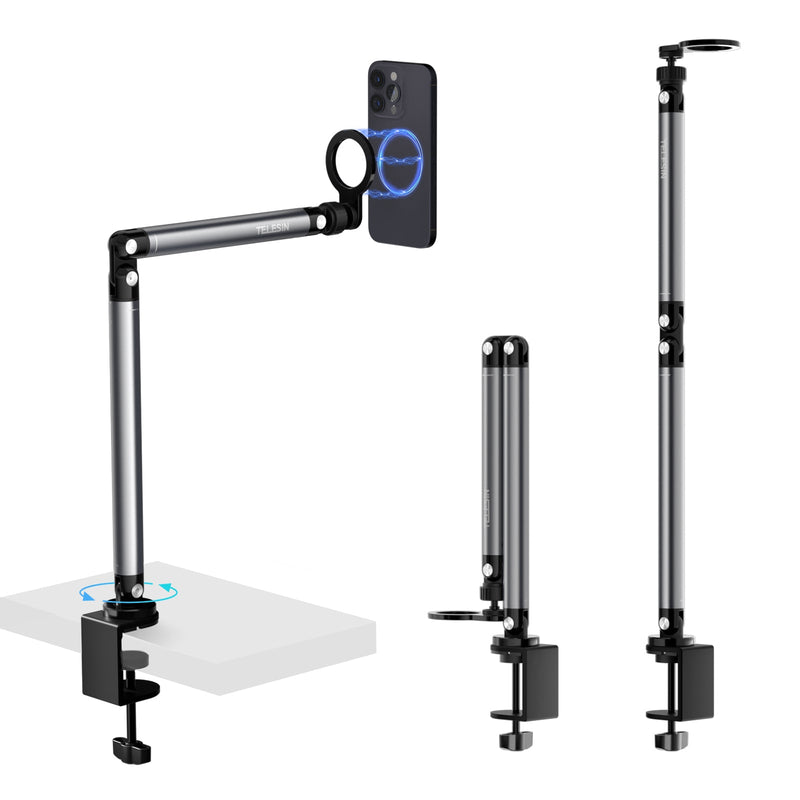


Keep your phone in position without giving up half your workspace. This magnetic desk phone mount clamps to the edge of a table and brings the camera forward on an adjustable arm—ideal for livestreams, calls and top-down videos.
· Secure desk-edge clamp
· Quick magnetic phone attachment
· Portrait, landscape and overhead positioning
· Damped joints for controlled adjustment
· Foldable cantilever arm
· 1/4"-20 interface for a compatible fill light
· Magnetic adapter ring included
· Designed for compatible iPhone and Android phones
Add to Cart
Secure checkout · International delivery · TELESIN customer support
Phone, fill light, phone cooler and wireless charger are not included.


A tripod works until its legs start competing with everything else on the table. The TELESIN mount attaches at the edge, leaving the center open for your laptop, products or whatever you’re working on.
Bring your phone up for a livestream or video call, turn it vertically for social content, or swing the arm over your workspace for a top-down view. The damped joints make it easy to refine the angle without moving the clamp.
When you’re finished, fold the arm back toward the desk edge instead of clearing away a separate tripod.
The magnetic holder lets you lift your phone away and snap it back into place without reopening a side clamp.
MagSafe-compatible iPhones and cases attach directly. For another compatible phone, apply the included magnetic adapter ring to a smooth, flat phone case before mounting.
The arm also includes a 1/4"-20 interface for a compatible lightweight fill light. A rear magnetic mounting area can accommodate a compatible phone cooler or magnetic charging accessory when your recording session runs longer.
Fill lights, cooling accessories and chargers are sold separately unless a bundle specifically states otherwise. Check their size, weight and mounting method before installation.
The product information currently lists support for phones under 6.5 inches. Check your phone and case dimensions before ordering.
|
Phone or setup |
What you need |
|
MagSafe-compatible iPhone |
Attach directly or use a MagSafe-compatible case |
|
Non-MagSafe iPhone |
Use the included magnetic adapter ring |
|
Compatible Android phone |
Use the included magnetic adapter ring |
|
Thick or rugged case |
Check the magnetic hold before use |
|
Soft or textured case |
Use a smooth, flat case for the adapter ring |
|
Phone over 6.5 inches |
Not recommended based on the listed specification |
|
Tablet |
Not supported |
The adapter ring needs a clean, flat surface. Thick, soft or heavily textured cases may weaken the connection or prevent the ring from adhering securely.
The desk clamp also needs a firm, flat edge with enough clearance underneath. Avoid glass, rounded edges, loose shelves and delicate surfaces that could crack or mark under pressure.
To set up the mount:
1. Place the clamp on a suitable desk or tabletop edge.
2. Tighten it until secure, taking care not to damage the surface.
3. Move the arm into the required position.
4. Attach your MagSafe-compatible phone or install the adapter ring first.
5. Check the clamp, joints and magnetic hold before recording.
Keep your phone in position without giving up half your workspace. This magnetic desk phone mount clamps to the edge of a table and brings the camera forward on an adjustable arm—ideal for livestreams, calls and top-down videos.
· Secure desk-edge clamp
· Quick magnetic phone attachment
· Portrait, landscape and overhead positioning
· Damped joints for controlled adjustment
· Foldable cantilever arm
· 1/4"-20 interface for a compatible fill light
· Magnetic adapter ring included
· Designed for compatible iPhone and Android phones
Add to Cart
Secure checkout · International delivery · TELESIN customer support
Phone, fill light, phone cooler and wireless charger are not included.
A tripod works until its legs start competing with everything else on the table. The TELESIN mount attaches at the edge, leaving the center open for your laptop, products or whatever you’re working on.
Bring your phone up for a livestream or video call, turn it vertically for social content, or swing the arm over your workspace for a top-down view. The damped joints make it easy to refine the angle without moving the clamp.
When you’re finished, fold the arm back toward the desk edge instead of clearing away a separate tripod.
The magnetic holder lets you lift your phone away and snap it back into place without reopening a side clamp.
MagSafe-compatible iPhones and cases attach directly. For another compatible phone, apply the included magnetic adapter ring to a smooth, flat phone case before mounting.
The arm also includes a 1/4"-20 interface for a compatible lightweight fill light. A rear magnetic mounting area can accommodate a compatible phone cooler or magnetic charging accessory when your recording session runs longer.
Fill lights, cooling accessories and chargers are sold separately unless a bundle specifically states otherwise. Check their size, weight and mounting method before installation.
The product information currently lists support for phones under 6.5 inches. Check your phone and case dimensions before ordering.
|
Phone or setup |
What you need |
|
MagSafe-compatible iPhone |
Attach directly or use a MagSafe-compatible case |
|
Non-MagSafe iPhone |
Use the included magnetic adapter ring |
|
Compatible Android phone |
Use the included magnetic adapter ring |
|
Thick or rugged case |
Check the magnetic hold before use |
|
Soft or textured case |
Use a smooth, flat case for the adapter ring |
|
Phone over 6.5 inches |
Not recommended based on the listed specification |
|
Tablet |
Not supported |
The adapter ring needs a clean, flat surface. Thick, soft or heavily textured cases may weaken the connection or prevent the ring from adhering securely.
The desk clamp also needs a firm, flat edge with enough clearance underneath. Avoid glass, rounded edges, loose shelves and delicate surfaces that could crack or mark under pressure.
To set up the mount:
1. Place the clamp on a suitable desk or tabletop edge.
2. Tighten it until secure, taking care not to damage the surface.
3. Move the arm into the required position.
4. Attach your MagSafe-compatible phone or install the adapter ring first.
5. Check the clamp, joints and magnetic hold before recording.
Where Bestsellers Reveal Themselves to You


Payment
For all online shopping, We accept paypal and credit card payments.
For wholesales customer, if the total amount more than 2000USD, please send us email to pay by company bank, the bank fee will cheaper than by PayPal.
Shipping Country
We ship to most countries worldwide. Here is an extensive list:Austria, Belgium, Bulgaria, Brunei, Canada, Croatia, Cyprus, Czech Republic, Denmark, Estonia, Finland, France, Germany, Greece, Hungary, Ireland, Indonesia, Italy, Japan, Latvia, Lithuania, Luxembourg, Malta, Malaysia, Mexico, Netherlands, Philippines, South Korea, Netherlands, Norway, Philippines, Poland, Portugal, Romania, Singapore, Slovakia, Slovenia, Spain, Sweden, Switzerland, Thailand, United Kingdom, United States, Canada, Australia, and etc.
Order Handling Time:
Will usually ship within 1-3 business days of receiving cleared payment.
Delivery Time:
The time frame of order delivery is divided into two parts
Shipping Methods:
Standard shipping and Express Shipping.
For standard shipping estimates, delivery time depends on the shipping address. Usually takes about 1-3 weeks, remote areas may be longer.
For express shipping estimated delivery time usually takes about 7-15 days with a $25--$35 shipping cost. Courier shipping if it does not arrive on time we will refund you the extra courier cost, not the product cost.
Free shipping on orders over $79 in some countries.
NOTE: All transit times are average and individual timelines may vary.
Due to strict customs inspection, battery products may have a long transportation time or be returned. If there are changes, we will notify you by email. Thanks for your understanding.If there is a mandatory time requirement or the logistics transportation time is too long, please contact us: info@telesin-store.com
Logistics and distribution:
In order to ensure that the items can be delivered to your home smoothly, please fill in the order address carefully and accurately. If the courier cannot be delivered due to the inability to contact the recipient, the recipient will bear the corresponding loss.
If you have any problems, please send an email to info@telesin-store.com.
Seleziona il tuo Paese/Regione
I prezzi e la disponibilità dei prodotti possono variare a seconda del paese/regione.
 Deutschland
Deutsch / € EUR
Deutschland
Deutsch / € EUR
 Italia
no / € EUR
Italia
Italiano / € EUR
 España
Español / € EUR
España
Español / € EUR
 France
Français / € EUR
France
Français / € EUR
 United States
English / $ USD
United States
English / $ USD
 العربية
العربية
العربية
Grazie per esserti iscritto!
Ti invieremo notizie e offerte speciali.


OTTIENI UNO SCONTO DEL 10%
Abbiamo uno sconto speciale pensato apposta per te!


