


A mini tripod should make the DJI Osmo Pocket 4 easier to carry and faster to use. If it adds so much bulk that you leave it in the hotel, it has missed the point.
For most city breaks, cafés, hotel rooms, and casual travel vlogs, a short, rigid tripod or a compact grip-tripod is the practical choice. It opens quickly, fits in a small bag, and works well on tables, walls, benches, and flat rocks. A taller extendable tripod is more useful for solo full-body shots, while wider or flexible legs make more sense for hiking and uneven ground.
So the “right” tripod is not the model with the longest spec sheet. It is the one that suits where you shoot, how high the camera needs to be, and how quickly you need to move from walking to recording.
|
Main use |
Best starting point |
What you gain |
What you give up |
|
City travel and cafés |
Fixed mini tripod |
Fast setup and solid support |
Limited height |
|
Walking vlogs and quick stops |
Grip-tripod |
Easy handheld-to-static switching |
Small support footprint |
|
Solo full-body shots |
Extendable tripod |
More framing height |
More wobble when extended |
|
Hiking and campsites |
Wide-leg or flexible tripod |
Better surface options |
Extra size or less rigidity |
|
Timelapse and static scenery |
Rigid tabletop tripod |
Fewer small movements |
Less angle and height flexibility |
What Does a Pocket 4 Mini Tripod Actually Need?
The Pocket 4 is small, but its upright shape puts the camera’s weight well above the mounting point. DJI lists the camera at 190.5 g, and its Handle With 1/4" Thread provides the standard tripod connection while moving the USB-C port to the rear for easier recording while charging.
That leads to three checks before you compare brands or prices.
A Clear Mounting Path
Look at the whole connection, not just the screw shown in a product photo. Will the tripod attach through the DJI threaded handle, a battery handle, or another adapter? Is that part included? Can you remove it quickly when you want to return to handheld filming?
“Compatible with Pocket 4” can mean several things. A product may use the right 1/4-inch screw but still depend on a separate handle or base. Check the package contents before ordering.
Enough Stability for the Setup You Really Carry
A load rating tells you whether the tripod can hold a certain weight. It does not tell you how easily the setup will tip when you tap the screen, connect a cable, or place it on a polished table.
Think about your everyday rig. Do you normally use a battery handle, microphone receiver, fill light, or expansion adapter? Each item raises or shifts the center of gravity. The wider the legs and the lower the camera, the more forgiving the setup usually feels.
Room for the Gimbal, Screen, and Cable
After mounting the camera, the gimbal should complete its startup movement without touching a knob or adapter. The screen should rotate freely, and the charging cable should not pull the tripod sideways.
This sounds obvious, but it is easy to miss when shopping online. A tiny ball head or oversized locking knob can sit uncomfortably close to a pocket gimbal camera.

Which Mini Tripod Style Fits the Way You Travel?
A useful travel setup starts with your most common shot, not your most ambitious one.
Fixed Mini Tripod: Best for Simple, Low-Profile Setups
A short rigid tripod is ideal for café tables, hotel desks, walls, benches, and timelapses. It has fewer moving parts, so setup is quick and there is less to loosen over time.
Its weakness is height. Put it on the ground and you will get a low angle. In a city, that may not matter because raised surfaces are everywhere. On an open beach or trail, it becomes more limiting.
This style suits travelers who want the smallest possible DJI Pocket 4 mini tripod and are happy to use the environment to raise the camera.
Extendable Tripod: Useful When the Camera Must Stand on Its Own
If you regularly shoot full-body introductions, solo travel scenes, or tracking clips in open spaces, an extendable model is easier to frame with. You are not waiting for the perfect wall or table.
The trade-off appears as soon as the center column goes up. A light breeze, a stiff cable, or a small knock has more leverage. Use only the height you need rather than extending every section by default.
Flexible Tripod: More Placement Options, Less Predictability
Flexible legs can wrap around a railing or sit across irregular rocks. That is handy on hikes, at campsites, and in places where flat surfaces are rare.
The downside is movement. Bendable legs and multiple joints are rarely as rigid as a simple fixed base. Before stepping away, press the setup lightly from several directions and watch for slow rotation or slipping. Near water, traffic, or a drop, add a safety tether.
Grip-Tripod: A Natural Fit for Fast Travel Vlogging
A 2-in-1 grip and tripod makes sense when you keep switching between walking narration and static shots. You do not have to carry a separate hand grip, stop to assemble several parts, and then take everything apart again.
The support base is usually smaller than that of a dedicated tripod, so this design is better for quick tabletop shots than tall, unattended setups in strong wind. Its real advantage is speed: one accessory stays on the camera and changes jobs as the shot changes.

Seven Things to Check Before You Buy
The following checks are more useful than comparing dozens of marketing claims.
1. Test the Complete Rig
Mount the camera exactly as you plan to use it. Add the handle, microphone, cable, or other everyday accessories. Then tap the screen, rotate the display, and start the gimbal.
If the tripod rocks every time you change a setting, it may become annoying on the road even if it never fully tips over.
2. Check the Footprint, Not Only the Load Capacity
A narrow base can hold a camera while still being easy to knock over. Look at how far the legs spread, whether they lock in place, and which direction the camera is most likely to fall.
On a small tripod, point one leg toward the heaviest side of the setup. That simple habit can make the support feel noticeably more secure.
3. Think About Real Packed Size
Where will the tripod live during a ten-hour sightseeing day: a pocket, sling bag, waist pack, or backpack?
A product can be light and still be awkwardly long. Another can weigh a few grams more but disappear neatly beside the camera. Pack it with the cables, filters, microphone, and power bank you already carry. That is a more honest portability test than looking at one measurement.
4. Match the Height to Your Usual Framing
List the shots you make most often. A seated café update, a low trail angle, and a tabletop product shot need very little height. A standing full-body clip needs much more.
There is no point carrying a tall tripod every day for one shot you film once a month. You may be better off with a tiny support for daily use and a larger tripod only for trips that need it.
5. Time the Setup
Take the tripod out of your bag and start a stopwatch. Stop when the camera is ready to record.
Can you do it one-handed? Do you need to remove the battery handle? Is there a loose adapter that could disappear in grass or sand? Can you switch back to handheld mode without putting the camera down?
The best travel accessory is often the one that removes three small steps rather than adding three headline features.
6. Check Grip on the Surfaces You Actually Meet
Try wood, glass, metal, a flat rock, grass, and a gentle slope. Rubber feet that feel secure on a desk may slide on a smooth outdoor table. Small feet may sink into soft ground.
Record a 30-second clip on each surface. Tap the screen once, step back, and look for immediate wobble or slow drift.
7. Know When Not to Use It
A mini tripod is not a safety system. Do not leave it unattended on a narrow railing, near a cliff, beside moving water, or in strong wind. Keep the camera low when conditions are uncertain and route charging cables where nobody can catch them.
After a beach or dusty hike, clean the leg joints and screw before folding the tripod into your bag. Sand turns an easy mechanism into a rough one surprisingly quickly.
Where the TELESIN 2-in-1 Mini Tripod & Grip Fits
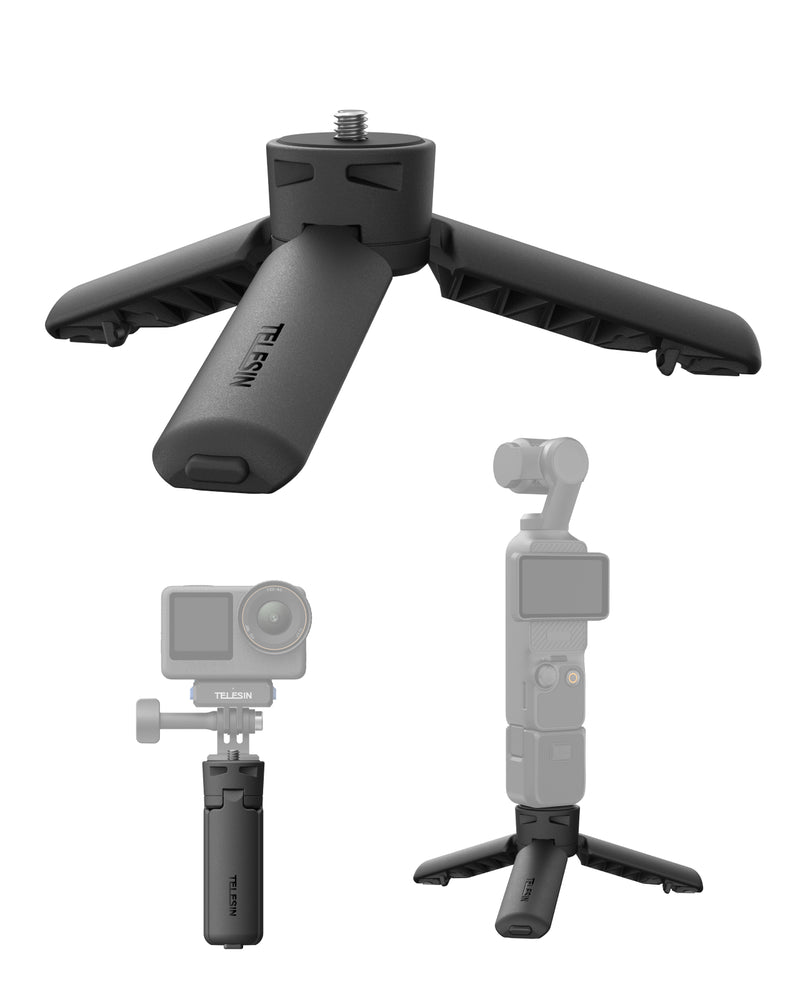
The TELESIN Mini Portable Tripod & Grip 2-in-1 is built for the everyday travel use case: keep the setup small, switch modes quickly, and avoid packing a separate hand grip and tabletop tripod.
It weighs 51 g and folds to 9.3 cm, so it is closer to an everyday-carry accessory than a conventional travel tripod. Pressing the bottom switch changes it from a handheld grip to a three-leg support. The linked-leg design opens and closes together, while separate safety locks secure the grip and tripod positions.
The open legs form a 120-degree support layout and use anti-slip silicone contact points. There is also a lanyard hole for adding a wrist strap, although a lanyard is not included. The body is made from glass-fiber-reinforced nylon, and the integrated 1/4-inch screw works with the DJI Osmo Pocket 4/3 and compatible small cameras or action cameras. Phone use requires a separate phone mount.
Where does that make sense in practice?
It is a good match for walking vlogs, quick talking-head clips, café tables, hotel desks, low-angle B-roll, and short timelapses. You can keep it attached as a grip, stop at a location, open the legs, and start recording without digging for another accessory.
It is not a full-height solo-vlogging tripod, and it is not designed to replace a heavy-duty outdoor support. The published maximum load is 200 g, while DJI lists the Pocket 4 camera body at 190.5 g. That leaves little stated capacity for a heavier accessory stack, so treat it as a compact Pocket 4 support rather than a platform for a battery handle, light, microphone receiver, and other add-ons all at once.
That distinction matters. The TELESIN 2-in-1 is strongest when your priority is carrying less and shooting sooner. For a windy ridge, a long unattended timelapse, or standing-height framing, bring a wider or taller tripod made for that job.
A simple two-tripod strategy can work well for frequent travelers: use the TELESIN grip-tripod as the everyday option, then pack a larger support only when the route or shot list calls for it. You avoid overpacking on normal days without pretending one tiny accessory can cover every situation.
Before buying any Pocket 4 tripod, ask yourself:
- Can I attach it without carrying another loose part?
- Does it remain stable with my normal setup?
- Will I use the available height?
- Can I open it quickly while walking?
- Does it fit the bag I actually carry?
- Am I expecting a tabletop accessory to do a full-size tripod’s job?
Answer those questions honestly and the choice becomes much easier.
FAQs
Q: Can the DJI Osmo Pocket 4 use a standard mini tripod?
A: Yes, when you use the Pocket 4 Handle with 1/4" Thread, battery handle, or another compatible mounting solution with a standard 1/4-inch connection. Check whether the required handle or adapter is included with your camera setup.
Q: Is a mini tripod enough for travel vlogging?
A: It is enough for tabletop clips, low-angle shots, hotel-room filming, timelapses, and city travel where you can use walls or tables for extra height. For full-body solo shots in open spaces, an extendable tripod is more useful.
Q: What makes a grip-tripod different from a regular tabletop tripod?
A: A grip-tripod stays useful while the camera is in your hand. You can film while walking, then open the legs for a static shot without changing accessories. A dedicated tabletop tripod may offer a wider, more rigid base but does not improve handheld use.
Q: Is the TELESIN 2-in-1 Tripod & Grip compatible with Pocket 4 and Pocket 3?
A: Yes. TELESIN lists compatibility with DJI Osmo Pocket 4, Pocket 3, and compatible small or action cameras using a 1/4-inch screw. A phone mount is not included.
Q: Can I use the TELESIN tripod with a battery handle and extra accessories?
A: Check the total weight carefully. TELESIN lists a 200 g maximum load, so it should be treated as a lightweight support rather than a base for a heavily accessorized rig. Test the complete setup on a safe, flat surface before filming.
Q: Is a flexible tripod better for hiking?
A: It gives you more placement options on railings, rocks, and irregular surfaces, but it is usually less rigid than a fixed tripod. Choose flexibility when mounting options matter most and a wide, rigid base when stillness matters most.
Q: How tall should a travel tripod be for solo vlogging?
A: It depends on the shot. Tabletop and seated clips need little height. Standing or full-body framing normally requires an extendable tripod, a raised surface, or a larger travel tripod.
Q: Can I leave a Pocket 4 on a mini tripod in windy conditions?
A: Avoid leaving it unattended. Keep the setup low, spread the legs fully, and move away from edges or water. If the tripod rocks or slides, stop using it and switch to handheld filming or a heavier support.
Q: Does the TELESIN 2-in-1 include a phone holder or lanyard?
A: No. The product includes the tripod-grip itself. A phone mount, lanyard, and other adapters are sold separately.
Q: Who is the TELESIN 2-in-1 best for?
A: It is best for travelers who want a compact hand grip and quick tabletop support in one 51 g accessory. It is less suitable for creators who mainly need eye-level height, strong-wind stability, or support for a heavy accessory setup.