


Introduction: Complete Setup Guide for TELESIN Pro Portable Fog Machine
If you shoot portraits, create short films, or make creative social content, you already know how much atmosphere elevates a shot. Soft fog adds depth, emotion, and that cinematic feel viewers instantly notice. But most affordable portable fog machines are frustrating: they leak liquid, produce inconsistent fog, overheat easily, and lack creative flexibility.
The upgraded TELESIN Pro Portable Fog Machine fixes those common pain points entirely. It comes with a fully leak-proof structure, an improved mesh heating system, 50% longer spray time, and a unique bubble fan attachment for one-of-a-kind mixed visuals. Designed specifically for on-location creators, it balances safety, stability, and creative control. In this guide, I’ll walk you through the exact setup, installation, operation, troubleshooting, and pro shooting tips to help you get the best results from your TELESIN Pro fog machine.
1. TELESIN Pro Fog Machine Full Product Specifications
 Before we jump into setup and shooting, let’s break down the official specs of the TELESIN Pro. Every upgrade is built for real-world content creation, making it one of the most practical portable fog machines for photography and videography.
1.1 Main Unit Hardware Specs
The main unit is compact and travel-friendly, measuring 58mm × 60mm × 164mm and weighing just 350g. It fits easily in any camera bag, perfect for studio sessions, outdoor shoots, and event filming. The textured plastic casing feels sturdy in hand and holds up well to regular on-location use.
Powered by a built-in 7.4V/2500mAh 18650 battery pack with a 15A continuous current rating, this 40W fog machine delivers strong, steady atomization. It charges via standard Type-C at 10W (5V/2A), reaching full power in roughly 2.5 hours. A standout feature is pass-through charging, so you can shoot while plugged in for unlimited runtime. For safety, fog density and airflow adjustments lock automatically during charging to prevent overheating. It works reliably in temperatures between 5°C and 45°C, and the bottom 1/4” threaded hole lets you mount it on tripods, light stands, and custom rigs.
1.2 2.4GHz Wireless Remote Controller Parameters
The included remote is one of the biggest quality-of-life upgrades on the TELESIN Pro. Ultra-compact at 26mm × 10mm × 98mm, it won’t take up valuable bag space. Its 1.06-inch TFT color screen clearly displays real-time modes, settings, and system warnings at a glance.
Using a stable 2.4GHz wireless connection, the remote pairs automatically when docked on the main unit — no confusing setup required. It works from up to 10 meters away, which is ideal for solo creators who need to adjust fog effects mid-shot. The remote’s small built-in 3.7V/200mAh polymer battery charges directly from the main unit while docked, so you never need separate charging cables or replacement batteries. Five physical buttons give you full control over modes, spray duration, fog density, and airflow.
1.3 Oil Tank & Food-Grade Fog Liquid Details
Leaky fog machines ruin shoots, stain gear, and create unnecessary stress. The TELESIN Pro solves this with a redesigned 10mL detachable oil tank and upgraded silicone sealing system. Even when tilted or repositioned mid-shoot, it resists spills and splashes.
TELESIN’s official fog liquid uses a safe, food-grade VG+PG formula. It’s non-toxic, odorless, and gentle on skin and lungs, making it safe for indoor studio work and close-up portrait shots. The 60mL liquid bottle provides long-lasting supply, while a full 10mL tank delivers over 10 minutes of continuous max-power fog — more than enough for batch portrait shooting and short film scenes.
1.4 Bubble Fan Accessory Complete Specs
To move beyond basic plain fog effects, TELESIN includes a dedicated bubble fan accessory. It adds floating bubbles that blend naturally with mist, creating dreamy, whimsical visuals you can’t get from standard fog machines. The fan uses simple one-touch operation: hold the button for 2 seconds to power on or off, with automatic startup for fast setup.
It produces steady airflow above 4CFM, evenly distributing bubbles through fog layers. The internal 3.7V/600mAh lithium battery offers up to 2 hours of runtime, with a 3.2V low-voltage cutoff to preserve battery health. Operating noise stays under 30dB, so it won’t disrupt audio recording during video shoots. A dual-color LED indicator clearly shows working, charging, and low-battery status for quick visual checks.
1.5 Global Safety Certifications & Compliance
The TELESIN Pro portable fog machine meets global safety and shipping standards. It carries China battery 3C certification, US FCC, UL, and FCCID certifications, European CE and REACH certifications, and Japanese PSE and METI certifications. It also includes complete air and sea transport documents, MSDS, and UN38.3 certification, ensuring safe worldwide shipping and professional commercial use.
2. Step-by-Step Installation & Assembly Tutorial
You don’t need technical experience to set up the TELESIN Pro fog machine. Below is a simplified, foolproof installation process to help you assemble and start your device correctly on the first try, avoiding common setup errors and leakage issues.
2.1 How to Install and Refill the Oil Tank Correctly
Follow these straightforward steps to install and refill your oil tank properly, preventing liquid leakage and device errors:
|
Step |
Operation Details |
Key Notes |
|
1 |
Align the 10mL detachable oil tank with the reserved slot on the main fog machine unit. |
Keep the tank horizontal during installation |
|
2 |
Push the tank firmly until you hear a click sound, confirming a fully locked connection. |
Loose installation causes detection failure and leakage |
|
3 |
Open the silicone sealing cap and slowly pour official TELESIN food-grade fog liquid into the tank. |
Do NOT overfill the tank |
|
4 |
Tighten the silicone cap completely to form a full seal. |
Incomplete sealing leads to liquid splashing |
|
5 |
Double-check the tank connection status before powering on the device. |
Ensure zero gaps for long-hour shooting |
2.2 Main Unit Mounting (1/4” Thread Interface Usage)
Thanks to the universal 1/4” threaded base, you can mount the TELESIN Pro fog machine almost anywhere for flexible shooting setups. Use these simple mounting steps:
|
Step |
Operation Details |
Scenario Tips |
|
1 |
Align the 1/4” threaded hole at the bottom of the main unit with your tripod or mounting screw. |
Works with tripods, light stands and custom shooting rigs |
|
2 |
Screw the unit into place loosely at first. |
Do not tighten fully before angle adjustment |
|
3 |
Adjust height and angle based on your framing needs. |
Medium height for portraits; tall stands for wide scenes |
|
4 |
Tighten the mounting screw fully to lock the position securely. |
Prevent shaking and maintain consistent fog output |
2.3 Remote Controller Auto-Pairing & Docking Setup
The 2.4GHz wireless remote uses automatic pairing, so you won’t waste time with complicated manual connections. Here’s how to set it up in seconds:
|
Step |
Operation Details |
Key Features |
|
1 |
Place the remote onto the dedicated docking slot on the main unit. |
Automatic contact and alignment |
|
2 |
Wait 1–3 seconds for auto-pairing to complete. |
No manual configuration required |
|
3 |
Leave it docked to charge automatically via pogo pin contacts. |
No separate charging cables needed |
|
4 |
Remove the remote for wireless control within the 10-meter range. |
Perfect for solo shooting and self-portraits |
2.4 Bubble Fan Installation & Power-On Setup
The included bubble fan adds unique dreamy fog-and-bubble effects with minimal setup. Use these quick steps:
|
Step |
Operation Details |
Usage Tips |
|
1 |
Position or mount the bubble fan next to your fog machine setup. |
Leave slight distance for even fog-bubble blending |
|
2 |
Long press the fan button for 2 seconds to power on. |
Instant startup with no complex settings |
|
3 |
Adjust angle and distance to refine bubble distribution. |
Creates soft, cinematic dreamy atmosphere |
|
4 |
Long press 2 seconds again to power off after shooting. |
Preserves battery life between shoots |
3. Complete Remote Control Operation Tutorial
 What makes the TELESIN Pro stand out is its precise, user-friendly control system. It offers four preset scene modes plus 36 customizable fog combinations, so you can dial in the exact mood you want for any video or photo shoot.
3.1 Remote Button Definition & Basic Power Control
The remote’s five physical buttons handle every core function: power, selection, adjustment (+/–), and spray trigger. To boot the system, dock the remote and hold the power button for 3 seconds. The TELESIN welcome screen appears briefly before loading the main interface. Hold the power button again for 3 seconds to shut down.
Use the selection button to toggle between mode, spray time, density, and airflow. The plus/minus keys fine-tune values. The spray button controls real-time fog output: hold for continuous mist, or double-tap to lock timed spray. A single tap stops any ongoing spray.
3.2 Four Core Fog Modes Explained (Free / Steam / Smeech / Dry Ice)
Each preset mode comes with factory-calibrated settings tailored for popular shooting styles, and you can tweak every parameter manually.
Free Mode: Level 1 density + Level 1 airflow. Perfect for beginners and custom creative work. You can adjust every setting freely to match your unique style.
Steam Mode: Level 1 density + Level 6 airflow. Produces light, soft, widely diffused mist. It’s ideal for lifestyle vlogs, casual portraits, and warm, gentle visual tones.
Smeech Mode: Level 6 density + Level 1 airflow. Creates thick, dense floating fog. This moody setting works great for dark cinematic portraits and emotional storytelling scenes.
Dry Ice Mode: Level 6 density + Level 4 airflow. Simulates low-sinking dry ice fog. It’s perfect for fashion shots, mysterious scenes, traditional style visuals, and stage-style content.
3.3 36-Level Custom Adjustment (6 Density × 6 Airflow Gears)
Beyond presets, you get full professional control with 36 unique fog combinations. Six density levels adjust fog thickness, while six airflow levels control how fast and how far mist spreads.
Low density paired with low airflow creates subtle, natural layering for close-up portraits. High density and high airflow quickly fill large spaces for wide-angle shots. This flexibility makes the TELESIN Pro one of the most adaptable portable fog machines for all shooting genres.
3.4 Custom Spray Timer Setting (0–500 Seconds)
The customizable timer is one of my favorite features for solo creators. You can set spray duration from 0 up to 500 seconds in 5-second increments.
The default unlimited setting works for quick manual shots. For long takes, fixed scenes, or timelapses, set your desired time and tap spray. The machine runs automatically with an on-screen countdown and stops once finished. It saves you from manually triggering fog mid-shoot.
3.5 One-Click Continuous & Timed Spray Operation
For dynamic shooting, hold the spray button for instant continuous fog and release to stop. For stable, consistent atmosphere, set a timer first then tap to start auto spray. You can pause timed spray anytime, giving you full flexibility over your shooting rhythm.
4. Remote Screen Interface & Status Icon Explanation
 The remote’s color screen shows real-time system status, connection health, and error alerts, so you can troubleshoot issues instantly without guessing.
4.1 Boot Welcome Interface & Main Interface Overview
After powering on, the screen briefly displays the TELESIN welcome screen before loading the main dashboard. The main view clearly shows current mode, remaining spray time, device power, and remote connection status.
4.2 Connection Status Display (Connected / Disconnected)
During pairing, the connection icon flashes white. Once stable, it stays solid white. If you move out of range or lose connection, the icon turns solid red to notify you to re-dock and reconnect.
4.3 Oil Tank Status Detection (Normal / Unconnected / Mismatch)
The system constantly checks oil tank status. “Oil Tank Connected” means everything is ready. If the tank is loose or missing, “Oil Tank Unconnected” appears and disables spraying to prevent dry burning. Using an incompatible tank triggers “Oil Tank Mismatch” to protect internal components.
4.4 Overheating Warning System (Tank & Machine Overheat Protection)
Safety protections prevent heat damage. The screen shows “Oil Tank Overheating” or “Machine Overheating” when temperatures rise too high. The unit automatically stops spraying and locks operations for roughly two minutes before resetting to Free mode.
Do not force restart during warnings. Let the device cool down fully before continuing your shoot.
5. Main Unit LED Indicator Light Full Guide
You don’t always need to check the remote screen. The main unit and bubble fan LED lights show clear status cues at a glance during on-location shooting.
5.1 White Light Status (Power On / Charging / Fully Charged)
Hold the main unit button for 3 seconds to power on, indicated by solid white light. While charging, the white light pulses in breathing mode. Once fully charged, the light stays solid white to signal you can disconnect power.
5.2 Red Light Warning (Low Battery / Abnormal Failure)
A steady red light means low main unit battery and requires charging. A flashing red light indicates system abnormality. Stop using the device immediately and inspect for issues.
5.3 Bubble Fan Dual-Color LED Status Rules
The bubble fan’s dual-color LEDs simplify status checks: solid green for normal operation, flashing red for low battery, breathing green during charging, and steady green once fully charged.
6. Pass-Through Charging Rules & Safe Usage Limits
Pass-through charging is incredibly useful for long outdoor shoots where battery swaps aren’t convenient. Simply plug in a power bank or wall adapter to run the fog machine continuously.
To avoid overheating, the system locks density and airflow adjustments during pass-through operation. The machine defaults to safe Level 1 settings while charging. The breathing white LED confirms active charging mode, and you can still view system status on the remote screen.
7. New Upgrades vs Old TELESIN Fog Machine
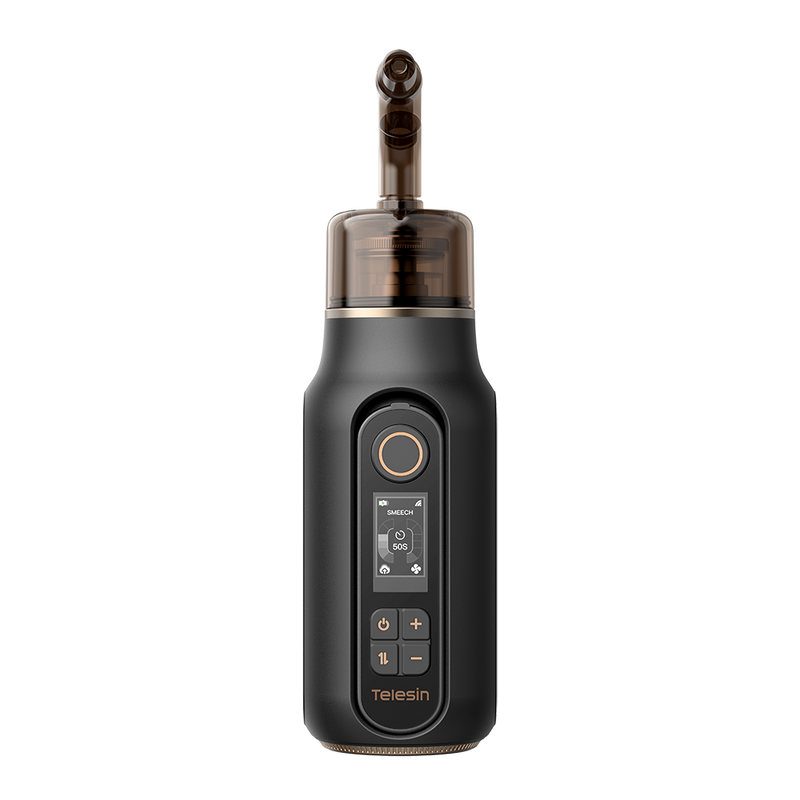
The TELESIN Pro upgrades the older C40 model in every key area, fixing common creator frustrations and boosting overall performance dramatically.
7.1 Heating System Upgrade: Coil Heating vs Mesh Heating
Older coil-based heating creates uneven atomization and frequent dry-burn risks. The new mesh heating system produces finer, more consistent fog particles with better heat distribution, improving stability during long shooting sessions.
7.2 Leak-Proof Structure & Multi-Inlet Air Design
Old single-inlet designs often cause liquid backflow and leakage. The TELESIN Pro adds multi-inlet airflow and upgraded silicone sealing, achieving full anti-leak and anti-splash performance that keeps your gear and shooting space clean.
7.3 50% Longer Continuous Spray Duration
Optimized atomization and power management extend single continuous spray time by 50% compared to the previous model. You get longer uninterrupted shots with fewer device pauses, perfect for professional content production.
8. Common Errors, Troubleshooting & Fixes
Most fog machine issues come down to simple setup mistakes. Here’s how to quickly diagnose and fix common problems with your TELESIN Pro fog machine.
8.1 No Spray / Oil Tank Detection Failure
If the machine won’t spray and shows tank errors, check whether the oil tank is fully locked into place. Loose installation is the top cause of detection failure. Re-seat the tank, confirm the silicone cap is fully sealed, and avoid overfilling fog liquid.
8.2 Overheating Warning & Automatic Shutdown Solution
Overheating warnings usually happen from low fog liquid levels causing dry burns or extended continuous use. Top up liquid if needed, then move the device to a cool, ventilated area to rest. Never force a restart during active cooling cycles.
8.3 Remote Disconnection & Re-Pairing Method
Frequent disconnections usually happen when you’re beyond the 10-meter range or the remote battery is low. Dock the remote back onto the main unit to auto-repair and recharge before continuing shooting.
8.4 Bubble Fan Low Battery & No-Wind Issues
If the bubble fan fails to start or runs weakly, check for a flashing low-battery red light. Charge it via 5V/1A USB power. Avoid running the fan below 3.2V, as it prevents startup and gradually damages battery health. Keep the air outlet clear for steady airflow.
9. Pro Tips for Better Fog & Bubble Shooting Effects
To get the most cinematic results, match your machine modes to your shooting style. Use Steam mode with the bubble fan for soft, dreamy portrait layers. For moody dark tones, rely on Smeech mode with timed spray for stable, thick fog.
For outdoor and wide scenes, mount the fog machine higher, increase airflow, and extend spray time to fill the frame evenly. Solo creators can use the 10-meter remote range and timed spray function to capture natural self-portraits without assistance. Always use official TELESIN food-grade fog liquid for consistent fog quality and long device lifespan.
10. Daily Maintenance & Long-Term Protection Guide
Simple regular maintenance keeps your TELESIN Pro fog machine performing like new. After each shoot, let the unit cool completely before cleaning. Wipe down the body, tank contacts, and air gaps with a dry cloth to remove residual dust and liquid.
Don’t leave old fog liquid inside the tank for days. Empty and clean it during long storage periods. Store all components in a cool, dry location away from extreme temperatures and moisture. Avoid extremely long non-stop operation during shoots, and pause occasionally to let the device rest.
Conclusion
The TELESIN Pro Portable Fog Machine upgrades traditional atmospheric tools with reliable leak-proof construction, longer spray runtime, precise 36-level adjustment, and creative bubble-fog hybrid effects. It eliminates the most common creator headaches while expanding your creative possibilities.
Whether you’re a professional portrait photographer, short-video creator, event filmmaker, or creative hobbyist, this all-in-one fog machine fits every shooting scenario. With proper installation, confident operation, and basic maintenance, your TELESIN Pro fog machine will become a go-to tool for consistently cinematic, high-quality content.


