You finish a run, review your footage, and find that every step sends the image bouncing up and down. Worse, the camera angle has gradually shifted, leaving much of the trail or road out of frame. Running with an action camera presents a different challenge from handheld shooting: repeated impact, mount movement, and camera settings all affect image stability.
The good news is that a few practical adjustments can make your footage more usable. This guide stays on one problem: why running footage shakes, and what to change about it. It does not compare body mounts or review neck mount features in general, because those have their own guides. If you are still assembling a kit for the trail,
running accessories and mounts is a reasonable place to start.
Why Does Your Action Camera Shake While Running?
Running footage often looks shakier than expected because several factors affect the camera at the same time. Each stride creates movement, the mount can introduce additional motion, and the camera’s stabilization system can only compensate for certain types of shake. Understanding these causes helps explain why footage may remain unstable even when an action camera has built-in stabilization.
Impact From Every Stride
Every running stride creates a repeated cycle of upward and downward movement, along with impact when your foot hits the ground. These forces travel through your body and the mounting structure to the camera, producing the familiar bouncing effect in POV footage. The amount of movement varies with running speed, stride length, surface firmness, and arm swing. Uneven trails and hard pavement can produce noticeably different footage, even with the same camera and mount.
A Loose or Poorly Positioned Mount
Movement can increase when the camera is not firmly connected to its mount or the mount shifts against your body. In these cases, the camera does not simply follow your running motion; it also moves independently within the mounting system. This adds another layer of sway and can cause the framing to drift as you run. The result may be footage that changes angle from one stride to the next, even when the overall direction of movement stays the same.
The Limits of Camera Stabilization
Electronic image stabilization (EIS) can reduce certain types of camera movement, but it cannot eliminate every source of shake. Its effectiveness depends on the camera system, the movement involved, and the available stabilization range. Large swings, loose connections, and changing camera angles can remain visible even when EIS is enabled. Stabilization is a trade-off rather than a free improvement, and that trade-off is set out in
why stability matters more than resolution.
5 Ways to Keep Your Action Camera Stable While Running
Improving running footage takes more than turning on image stabilization. The way your camera connects to the mount, how the mount fits your body, and how you configure your camera all affect the final result. These five adjustments address the most common sources of unwanted movement.
1.Pick a Mount That Locks the Camera Securely
Look beyond whether a mount is compatible with your action camera. Check how the camera attaches, whether the locking mechanism holds firmly, and how much the mount can move against your body. A secure connection should keep the camera from shifting independently as you run. Pay particular attention to joints, clips, and adjustable sections, since movement at any connection point can affect the footage. If you want to see what connection types exist before you settle on one,
action camera mounts covers the range.
2.Wear It Snug, Not Tight
A body mount should sit close enough to your body to limit movement without restricting your breathing or natural stride. As a general guide, you should be able to slip a finger between the strap or contact area and your body without forcing it. The right fit depends on the mount design and your build, so comfort and stability matter more than simply tightening everything as much as possible.
3.Check Every Connection Before You Run
Make sure the camera is fully secured to the mount and that every clip, hook, buckle, or locking mechanism is properly engaged. If the mount has adjustable joints, check that they hold their position rather than slipping or springing back under movement. A camera that appears attached may still have a loose connection elsewhere in the system. Each connection matters because movement at one point can affect the entire setup.
4.Use the Right Stabilization Setting
Choose an image stabilization mode suited to your camera and the intensity of your run. Some cameras offer different levels of stabilization or modes designed for more demanding movement, but the available options vary by model. Stronger stabilization may also crop the image or change the effective field of view. Check your camera’s settings and documentation so you understand the trade-offs before recording.
5.Test Walk First, Then Run
Start with a short walking test before moving to a brief, easy jog. Review the footage for three issues: vertical bouncing, side-to-side sway, and changes in camera angle. Each points to a different part of the setup that may need attention. Make one adjustment at a time and compare the results, rather than changing several things at once. Once the footage looks consistent at a lower intensity, gradually test it at your usual running pace.

How Mount Type Changes the Shake You Get
The mount you choose does more than affect comfort. Under running impact, it decides how much of each stride reaches the sensor. Two mounts can feel equally comfortable while you are standing still and behave very differently once you move at pace.
If you have not settled on a body mount yet, the full
neck mount vs chest mount comparison covers the buying decision in detail. This section stays on one question instead: which one moves less while you run.
What Each Mount Does Under Stride Impact
A neck mount keeps the camera close to your centre of mass, so vertical bounce travels a shorter, lighter path. It also means the camera moves with your torso rather than against it, which usually limits horizontal swing. The trade-off is that a neck mount can rotate or shift at the joint where it meets the camera, and that movement is easy to mistake for camera shake when you review footage.
A chest mount anchors the camera to a larger, flatter surface, so the framing tends to stay where you set it. The harness has to absorb every impact, and a harness that is loose or rides up will introduce movement of its own. Over a long run, chest-mounted footage can drift as the strap settles and the camera settles with it.
Neither design removes impact. What changes is where the movement enters the system, and how easily you can correct it mid-run.
Stability Criteria That Matter When Running
Buying guides for action camera neck mounts tend to treat every feature as equally important. For running, only a few of those features actually change your footage. This section covers those and skips the rest. For the full feature breakdown of neck mounts, see the
hands-free POV shooting guide.
Does the Mount Absorb Impact or Pass It Through?
Watch what the camera does at the exact moment your foot strikes the ground. If it jumps on every footfall, the mount is passing impact straight through rather than damping it. A rigid frame with no contact point against your body tends to behave this way. A mount that rests on the collarbone or upper chest gives the force somewhere to go before it reaches the camera.
Does the Mount Hold Its Angle Under Movement?
An adjustable angle only helps if the mount stays where you put it. Once you are moving, a joint that creeps a few degrees per stride will push the horizon out of frame, and you usually notice only after the run. Look for defined locking positions rather than continuous friction, and check the mount again a few minutes in.
Can It Carry Your Camera's Weight Through a Long Run?
Camera weight is a stability factor as much as a comfort factor. A heavier camera changes how much the mount has to resist, and the fatigue that builds over a long run changes how snug the whole setup still feels. Check what your combination actually weighs before assuming a mount rated for a light camera will hold a heavier one.
Which Cameras Does It Actually Fit?
Confirm that the mount supports your specific action camera model and attachment interface. Similar-looking cameras may use different mounting systems, and compatibility can vary by model or accessory configuration. Check the manufacturer's compatibility information rather than relying on appearance alone. You can browse options by brand under
GoPro compatible mounts and
Insta360 mounts.
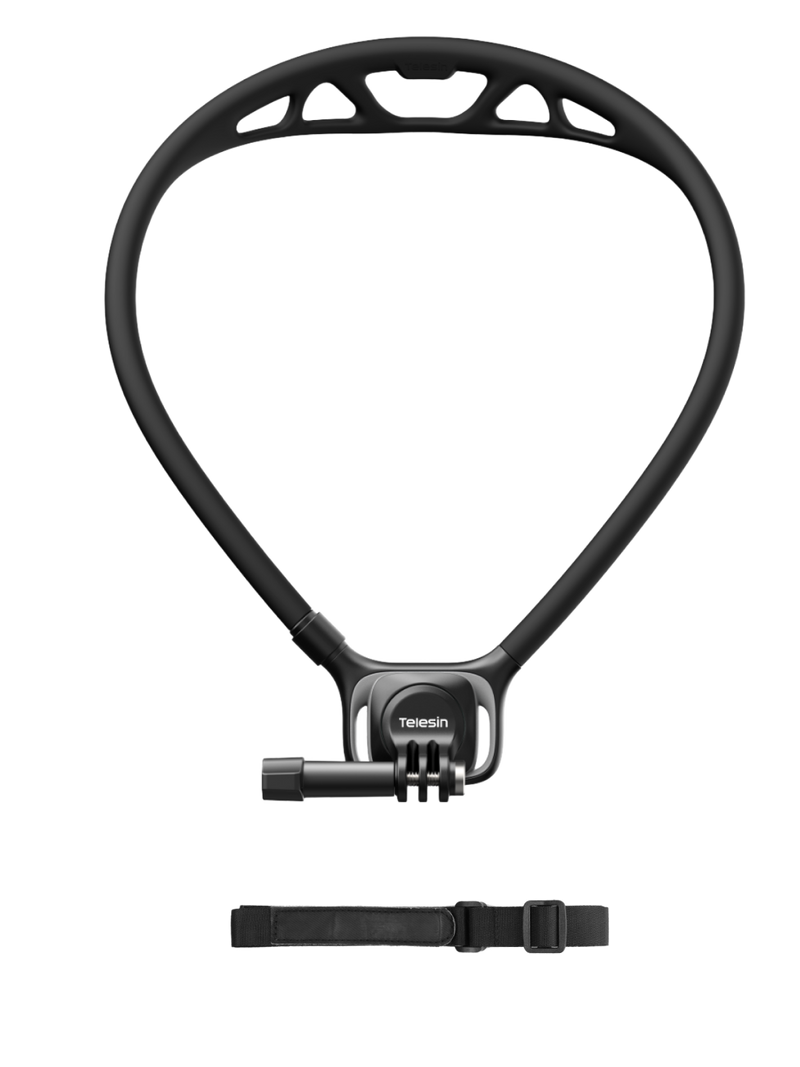
Setting Up the Telesin SE 3 for Running
The Telesin SE 3 is a neck mount designed for
hands-free POV recording, with different features available on the flagship and Base versions. Before using it for running, check which version you have and follow the corresponding attachment and adjustment method.
| Feature |
SE 3 Flagship |
SE 3 Base |
| Frame |
Reinforced square frame |
Classic rounded frame |
| Angle adjustment |
360° damped rotation with 90° ball-head positioning |
Fixed angle; not adjustable |
| Quick release |
Magnetic quick release |
Traditional insert buckle |
| Neck support |
Bird's Nest ventilated hollow design with adaptive fit |
Standard neck support |