


You do not need a studio to make polished YouTube Shorts. In most cases, a stable phone position and better light will improve your video more than buying a new phone.
The right setup depends on what you shoot. Desk-based creators need repeatable framing. Fitness and fashion creators need more height. Travel creators need gear that packs small and sets up fast. Here is how to choose a TELESIN tripod and light around your filming style.
What Is the Best TELESIN Phone Setup for YouTube Shorts?
For most creators, the best phone setup for YouTube Shorts is a tripod that holds the phone securely in vertical orientation, plus a compact light that keeps the subject in focus.
Start with the problem you need to fix. If your frame shifts between takes, choose a sturdier stand. If your face looks dark against the background, add a front light. If you film alone from several feet away, prioritize tripod height and a Bluetooth remote.
A useful setup should be easy enough to rebuild in a minute. The less time you spend balancing your phone and moving lamps, the more likely you are to keep filming.
Which TELESIN Tripod Fits Your Shorts Style?
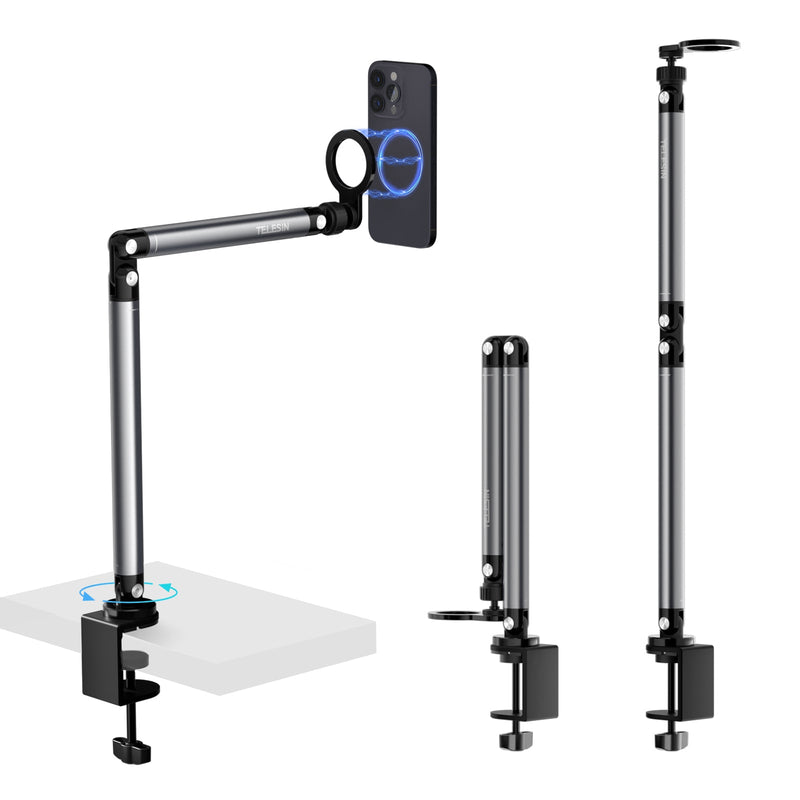
For talking-head videos, beauty content, tutorials, and product demos, the TELESIN Magnetic Desktop Phone Stand is the practical choice. It keeps the phone at a consistent angle and suits creators who batch-record at the same desk. Place the lens near eye level, or tilt it down for hands-on product shots.
For fitness, dance, fashion, or other full-body content, use the TELESIN 1.3m Magnetic Remote Control Selfie Stick. The extra height makes vertical full-body framing easier, while the remote lets you record without walking back to the phone after every take.
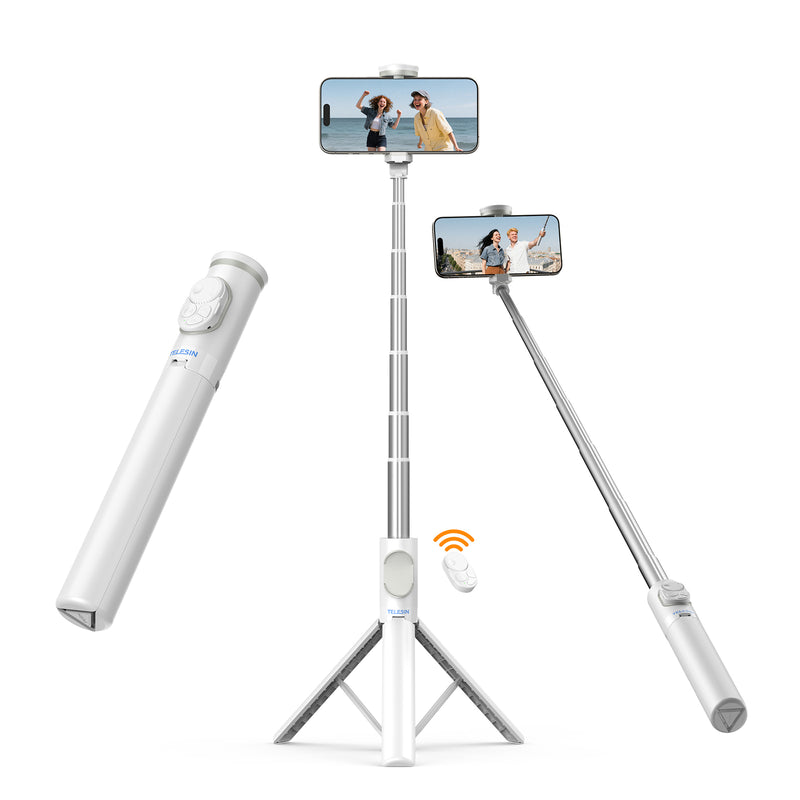
For travel and everyday content, the TELESIN Mini Magnetic Bluetooth Selfie Stick is easier to carry. It switches between a handheld grip and a small tripod, which works well in cafés, hotel rooms, and outdoor locations.
Choose by shooting distance: desktop stand for close, fixed shots; extendable tripod for full-body videos; mini tripod for mobile filming.
Which TELESIN Light Works Best?
A ring light is the easiest option for talking-head, beauty, and close-up videos. The TELESIN C03 Magnetic Selfie Ring Light adds front light near the phone, helping reduce heavy shadows around the eyes and face.
Do not automatically use the brightest setting. Too much light can flatten facial features, wash out pale products, or create reflections in glasses. Start low and place the light slightly above eye level.
For travel, product close-ups, night scenes, or creative backgrounds, the TELESIN Magnetic Ice Cube Light offers more flexibility. Its adjustable white light can suit warm interiors or cooler daylight, while RGB modes can add color behind the subject.
Use colored light as an accent. When viewers need to see skin tone, makeup, food, or product color accurately, keep the main light neutral.
How to Set Up Your Tripod and Light
Mount the phone vertically in a 9:16 frame before adjusting anything else. Leave room around your face, hands, or product for captions and YouTube interface elements.
Set the tripod height to suit the shot:
- Talking-head videos: lens close to eye level.
- Beauty videos: slightly above eye level.
- Product demos: use a higher angle so your hands and the product remain visible.
- Full-body videos: step back and test your widest movement.
Place the light in front of you or slightly to one side. Avoid relying only on a ceiling light, which often creates shadows under the eyes and chin. If there is a bright window, face it rather than standing with it behind you.
Record a ten-second test before the full Short. Check framing, focus, reflections, background, and whether the tripod moves when you touch the phone. Use the Bluetooth remote when available so the setup stays in place.
Which Setup Should You Choose?
Choose the TELESIN Magnetic Desktop Phone Stand with the C03 Ring Light for talking-head, beauty, teaching, and desk-based product content.
Choose the 1.3m Magnetic Remote Control Selfie Stick for fitness, fashion, dance, and any Short that needs full-body framing.
Choose the Mini Magnetic Bluetooth Selfie Stick with the Magnetic Ice Cube Light for travel, lifestyle, nighttime, and fast on-location filming.
There is no need to build a large creator kit on day one. Start with the tripod that matches your usual camera distance, then add the light that solves your most common lighting problem.
The best phone setup for YouTube Shorts is the one you can set up quickly, trust to stay steady, and use often. Explore TELESIN phone tripods and creator lights to build a setup around the way you shoot.
Frequently Asked Questions
Q1: What is the best phone setup for YouTube Shorts?
A: For most creators, the best setup is a stable vertical phone tripod paired with a compact light. Talking-head creators usually need a desktop stand and ring light, while full-body and travel creators benefit more from an extendable or portable tripod.
Q2: Do I need a tripod to film YouTube Shorts?
A: A tripod is not essential, but it makes filming much easier. It keeps the frame steady, helps maintain the same angle between takes, and allows you to record hands-free when filming alone.
Q3: Which TELESIN tripod is best for recording myself?
A: Choose the TELESIN Magnetic Desktop Phone Stand for seated or desk-based videos. For fitness, fashion, dance, or full-body Shorts, the 1.3m Magnetic Remote Control Selfie Stick offers more height and easier remote recording.
Q4: What is the best portable phone tripod for travel Shorts?
A: The TELESIN Mini Magnetic Bluetooth Selfie Stick is a practical option for travel. It works as both a handheld grip and a compact tripod, so you can switch quickly between selfie shots and fixed filming.
Q5: Is a ring light good for YouTube Shorts?
A: Yes. A ring light works well for talking-head, beauty, skincare, and close-up videos because it helps reduce strong facial shadows. Keep the brightness moderate to avoid washed-out skin or reflections in glasses.
Q6: Where should I place the light when filming with my phone?
A: Place the light in front of you or slightly to one side, ideally just above eye level. Avoid using only a ceiling light or standing with a bright window directly behind you.
Q7: Should I choose a ring light or a portable magnetic light?
A: Choose a ring light for consistent facial lighting in a fixed setup. A portable magnetic light is better for travel, product close-ups, night filming, or adding color to the background.
Q8: How high should my phone tripod be for YouTube Shorts?
A: For talking-head videos, place the lens close to eye level. For beauty videos, position it slightly higher. Full-body videos require more distance and height so your head, feet, and movements remain inside the vertical frame.
Q9: Can I make good YouTube Shorts with only a phone?
A: Yes. A capable phone is enough to start. Before upgrading the phone, improve the setup with stable support, better lighting, a clean lens, and a short test recording to check framing and focus.
Q10: How can I film YouTube Shorts by myself?
A: Use a tripod with a Bluetooth remote or your phone’s timer. Set the phone to vertical 9:16, frame the shot, position the light, and record a short test clip before filming the full video.