


The DJI Osmo Pocket 4P is built for the kind of filming that happens on the move. You can pull it out for a quick street shot, record a walk-and-talk clip, or capture a full travel day without carrying a traditional camera bag.
The camera itself is only one part of that experience, though.
Once you start filming for more than an hour or two, a few practical problems usually show up. The battery drops faster than expected. Please put the camera down for a solo shot. Bright sunlight makes exposure harder to control. At night, your face looks darker than the background. Then there is the question of how to carry the camera without leaving the gimbal and screen loose inside a backpack.
That is where a well-chosen set of DJI Osmo Pocket 4P accessories makes a real difference.
You do not need to buy every available mount, filter, or handle. A useful creator kit should make the camera easier to use, not turn it into a complicated rig. For most vloggers, the best place to start is with extra power, a compact tripod, basic protection, and one or two accessories that match the way they normally shoot.
What Should a DJI Osmo Pocket 4P Creator Kit Include?
There is no universal Pocket 4P kit. A creator filming restaurant reviews will need a different setup from someone recording walking tours or outdoor travel videos.
Instead of shopping by product category, think about the moments that usually interrupt your shoot.
Build Around the Way You Actually Film
A practical DJI Osmo Pocket 4P creator kit generally covers five areas:
- enough power to get through the day;
- a stable option for solo and static shots;
- filters for difficult outdoor light;
- mounts or frames for alternative angles;
- protection that does not make the camera harder to access.
You may not need all five immediately.
Someone filming short clips at home might only need a tripod and screen protector. A travel vlogger who spends all day outside will probably get more value from a battery handle, filters, and a quick-access carrying strap.
The easiest way to avoid overbuying is to start with the problem you encounter most often.
Which Accessories Should You Buy First?
For a new Pocket 4P owner, protection and camera support are usually the most sensible first purchases. A case, wrist strap, screen protector, and compact tripod improve everyday use without adding much weight.
Extra power and filters become more useful as your shoots get longer and move outdoors. Mounts, frames, and fill lights are better added once you know exactly why you need them.
That order keeps the setup simple and gives each accessory a clear role.
Keep Shooting Longer with a Battery Handle
Battery anxiety tends to arrive at the worst time.
You may have spent the morning recording short clips without paying much attention to the battery level. Then sunset arrives, the street lights turn on, and the camera has barely enough power left for one more take.
For creators filming full travel days, extra power is less about convenience and more about keeping the story going.
Why Battery Life Matters for All-Day Vlogging
A finished ten-minute vlog may come from hours of scattered recording. Between the usable clips, you are reviewing footage, adjusting settings, repeating introductions, and capturing small details that may or may not make it into the final edit.
Plugging the camera into a power bank works, but cables quickly become annoying when you are walking between locations. You also have to stop, pack everything away, and reconnect it later.
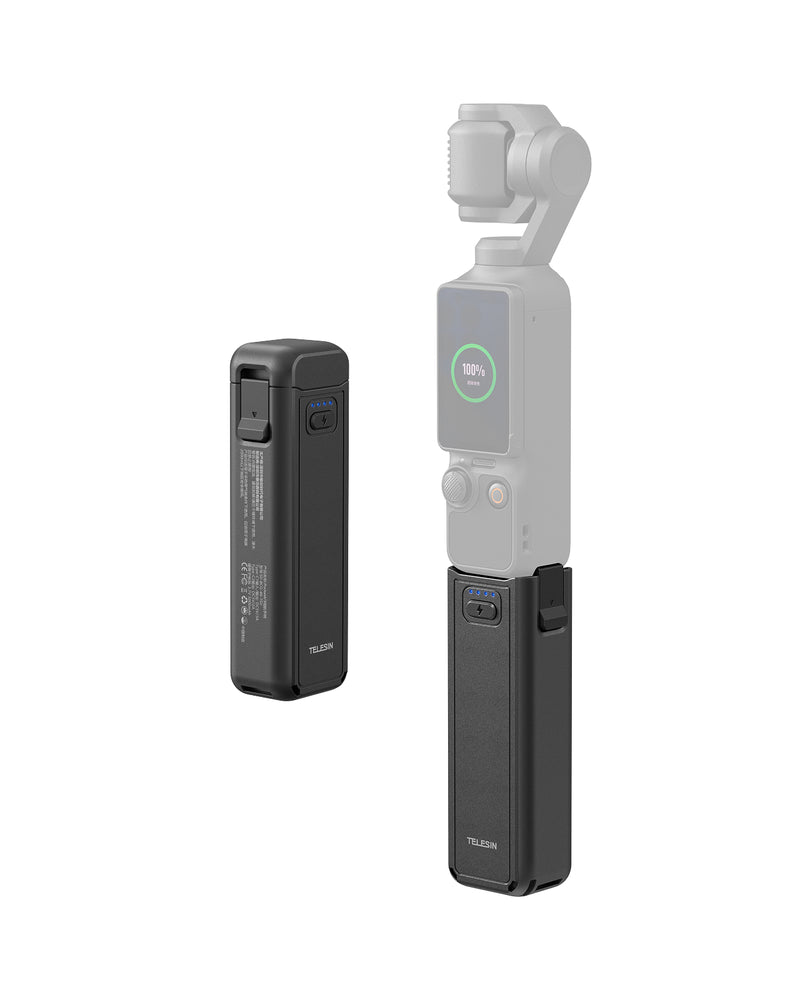
A battery handle keeps the extra power attached to the camera and gives you a larger grip at the same time. That makes it particularly useful for walking videos and longer handheld sessions.
TELESIN Battery Handle for DJI Osmo Pocket 4P
The TELESIN Battery Handle combines a 5000mAh battery with a more comfortable handheld form. It is rated for up to seven hours of shooting, although actual runtime will depend on camera settings and how the device is used.
Dual USB-C ports allow the handle to support the camera and provide emergency charging for another device. There is also a standard 1/4-inch thread at the base, so the camera can move from handheld shooting to a tripod without changing the whole setup.
The quick-release connection is useful when you do not want the handle attached all the time. Keep the camera compact for short outings, then add the handle for travel days, events, or longer recording sessions.
Who Will Get the Most Use from It?
A battery handle makes sense for:
- travel vloggers filming from morning to night;
- creators covering festivals, exhibitions, or events;
- walking-tour channels;
- lifestyle creators recording dozens of short clips throughout the day;
- anyone who regularly ends a shoot with a nearly empty battery.
It may be less important for short indoor sessions where a charger is always nearby.
For creators who often outlast the camera’s standard battery, the TELESIN Battery Handle is one of the most practical upgrades in the kit.
Switch from Handheld Vlogging to Stable Shots in Seconds
Handheld filming is where the Pocket 4P feels most natural. The problem starts when you want to step into the frame.
Balancing the camera against a cup or placing it on a low wall can work, but it rarely gives you a reliable angle. A small tripod makes solo filming much easier and adds more visual variety to the final edit.
Why a Compact Tripod Belongs in a Vlogging Kit
A tripod gives you a stable frame for:
- walk-in travel shots;
- seated introductions;
- hotel-room updates;
- product demonstrations;
- time-lapses;
- food and café content;
- group photos and videos.
It also helps break up a sequence of constantly moving footage. A few locked-off shots can make a travel video feel more deliberate without losing the spontaneous quality of a pocket camera.
Use a Quick-Release Tripod for Faster Setup
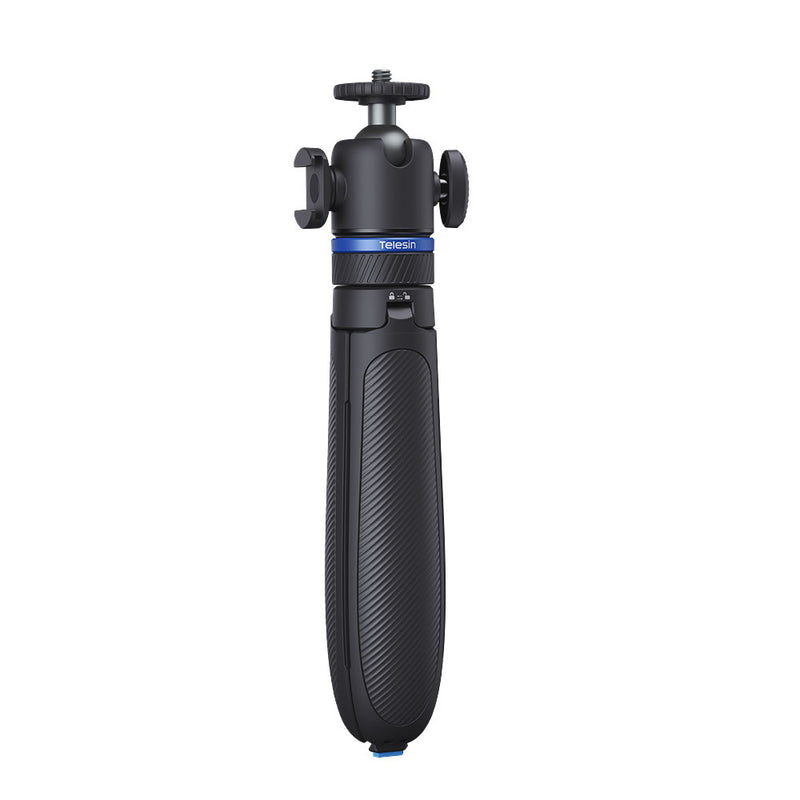
The TELESIN 65cm Quick-Release Tripod is designed for creators who want to move quickly between handheld and static filming.
Its one-touch opening mechanism reduces the time spent unfolding and adjusting tripod legs. The adjustable head supports different shooting angles, and the standard 1/4-inch connection means the tripod can also be used with other compatible creator gear.
At 65cm, it is still a compact travel tripod rather than a full-height studio stand. For eye-level shots, you may need to place it on a table, bench, wall, or other raised surface.
That trade-off is often worth it for travel creators. A smaller tripod is more likely to stay in the bag and actually get used.
Where It Works Best
For solo travel videos, set the camera ahead of you and walk naturally into the scene.
For talking-head clips, place them on a café table or hotel desk and keep both hands free.
For food or product content, a stable frame makes it easier to arrange items without constantly checking whether the camera has moved.
For time-lapses and wide establishing shots, a tripod gives you the consistency that handheld filming cannot.
A good DJI Osmo Pocket 4P tripod should be quick enough to use before the moment passes. That matters more than having the tallest possible support.
Get a More Cinematic Look with Pocket 4P Filters
Filters are often marketed as a shortcut to “cinematic” footage. They are more useful when viewed as control tools.
A filter cannot fix weak framing or uninteresting light. It can, however, help you manage exposure, reduce reflections, or create a more consistent visual mood.
Why Filters Matter for Outdoor Vlogging
Outdoor light changes constantly.
You may leave a shaded street, step into direct sunlight, then enter a reflective open square within a few minutes. Automatic settings can handle these changes, but they do not always produce the motion or exposure you want.
Different DJI Osmo Pocket 4P filters solve different problems, so it is worth knowing what each one is designed to do.
Use a VND Filter for Changing Outdoor Light
A variable neutral-density filter reduces the amount of light entering the lens. Unlike a fixed ND filter, it lets you adjust the level of light reduction within a range.
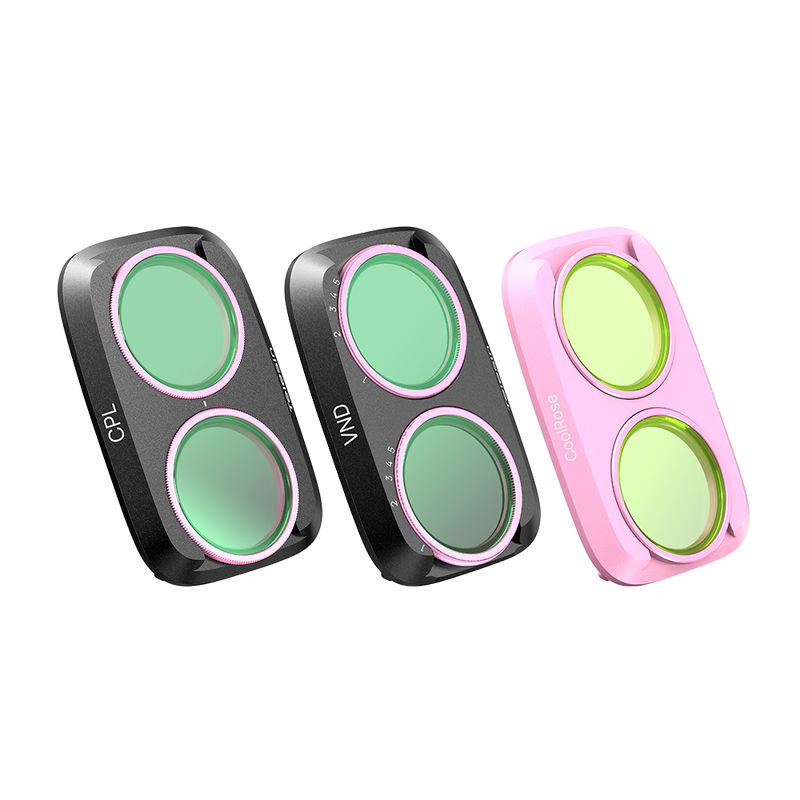
The TELESIN VND 2–32 filter is particularly useful for travel creators moving between different lighting conditions. Instead of changing filters each time the sun becomes stronger or weaker, you can adjust one filter as the scene changes.
It is useful for:
- midday street footage;
- beaches and open landscapes;
- outdoor interviews;
- city walking videos;
- sunrise and sunset sequences;
- scenes where you want more control over motion.
A VND still needs to be checked and adjusted. It is not something to attach once and ignore for the rest of the day.
Use a CPL Filter to Manage Reflections
A circular polarizing filter helps reduce certain reflections and improve clarity when the light and camera angle are suitable.
It can be useful when filming:
- water;
- glass storefronts;
- cars;
- wet streets;
- foliage;
- bright outdoor scenery.
The result changes depending on the angle of the light, so the effect will not be identical in every shot. Check the screen and rotate or reposition the filter until the reflection is reduced to the level you want.
A CPL is best used when glare is hiding part of the scene. It does not need to stay on the camera all day.
Use a Cool Rose Filter for Lifestyle Content
The TELESIN Cool Rose Filter is less about fixing exposure and more about shaping the look of the footage.
It suits content such as:
beauty and fashion videos;
café and city vlogs;
travel portraits;
lifestyle Reels;
softly lit indoor scenes.
A creative filter works best when it fits the visual identity of the channel. It may look great in a portrait sequence but feel out of place in every landscape shot.
Use it as a stylistic choice rather than a default setting.
VND vs. CPL vs. Cool Rose
|
Filter |
What it does |
Best used for |
|
VND |
Controls incoming light |
Outdoor video and changing daylight |
|
CPL |
Reduces certain reflections |
Water, glass, cars and landscapes |
|
Cool Rose |
Adds a stylized color treatment |
Portrait, beauty and lifestyle content |
Creators who use all three may prefer the TELESIN filter kit, which combines VND 2–32, CPL, and Cool Rose options.
Those who only shoot occasionally can start with the filter that solves their most common problem.
Expand Your Shooting Angles with Mounts and Frames
The Pocket 4P is easy to hold, but handheld footage should not be the only perspective in your video.
A few alternative angles can make a simple sequence feel much more complete. The key is choosing a mount for a specific shot rather than adding attachments simply because they are available.
Use a Magnetic Expansion Mount for Faster Repositioning
The TELESIN Magnetic Expansion Mount is designed for quick changes between compatible supports and filming positions.
That can be helpful when moving between:
- handheld filming;
- fixed surfaces;
- low-angle shots;
- compact support systems;
- different creator rigs.
The main advantage is speed. When changing positions takes too long, most creators keep using the same angle. A faster connection makes it easier to experiment without interrupting the flow of the shoot.
Always check that the camera is properly secured before letting go, especially outdoors or in crowded spaces.
Capture Hands-Free Footage with a Backpack Mount
A backpack mount can add a first-person angle while leaving your hands free for luggage, maps, food, or other equipment.
The TELESIN Quick-Release Backpack Mount works well for:
- walking tours;
- hiking sections;
- behind-the-scenes travel footage;
- short first-person sequences;
- transitions between locations.
Hands-free clips are usually most effective in small doses. A few seconds can help viewers feel part of the journey, while a long unbroken walking sequence may become repetitive.
Check the connection before moving, and consider an additional safety attachment for rough terrain or faster movement.
Add a Light or Accessory with an Expansion Frame
An expansion frame gives the Pocket 4P extra mounting options when the standard camera body is not enough.
The TELESIN Metal Expansion Frame and Multi-Functional Frame can support more flexible setups involving a compact light, additional grip, or alternative mounting position.
A simple metal frame may be enough for creators who only need one additional attachment point. The multi-functional option suits users who change their setup more often.
Every added component increases the overall size of the camera, so there is little reason to keep a full rig assembled when the shot does not require it.
Build for the scene, then strip the camera back down when you are finished.
Which Mount Fits Your Shooting Style?
|
Accessory |
Best for |
Main benefit |
|
Magnetic Expansion Mount |
Quick support changes |
Faster repositioning |
|
Backpack Mount |
Walking and travel footage |
Hands-free filming |
|
Metal Expansion Frame |
Simple accessory expansion |
Extra mounting point |
|
Multi-Functional Frame |
Flexible creator setups |
More rigging options |
The right mount is the one that helps you capture an angle you would otherwise miss.
Improve Indoor and Night Vlogs with a Compact Fill Light
 Low-light footage can be bright enough to see while still looking flat or unflattering.
This is common in restaurants, hotel rooms, night markets, and indoor spaces where the background lighting is stronger than the light on your face.
A compact fill light can help without turning a lightweight Pocket setup into a full production rig.
When Additional Lighting Helps
A fill light is most useful for:
- night introductions;
- restaurant and café clips;
- hotel-room vlogs;
- indoor interviews;
- beauty and fashion content;
- close-up product shots;
- scenes where the subject is darker than the background.
It is less important for wide night scenes where the environment itself is the subject.
Why Bi-Color Lighting Is Useful
The TELESIN Dual Mini Fill Light Set offers compact bi-color lighting for compatible Pocket setups.
Adjustable color temperature helps the light fit different environments. A warm hotel room and a cool outdoor street scene may need different settings to avoid making the subject look disconnected from the background.
Two small lights also give you more flexibility than one fixed light. You can use them for more even facial lighting or position one to soften the shadow created by the other.
This is still a portable solution, not a replacement for professional studio lighting. Its strength is that it is easy enough to carry and fast enough to use during a normal travel day.
Build a Simple Low-Light Setup
Pair the fill lights with an expansion frame for a compact handheld setup.
Use them with a tripod for hotel-room updates, interviews, or product content.
Combine them with the battery handle when you expect a longer indoor session.
Start with a low brightness level and increase it gradually. The goal is to support the available light, not make the subject look as though they are standing in front of a spotlight.
Protect Your Pocket 4P While Traveling
Protection is easy to ignore until the camera has spent several days sharing a bag with keys, charging cables, power banks, and other accessories.
The Pocket 4P has moving components and exposed surfaces, so carrying it loose is not ideal.
Use a Carrying Case for the Gimbal and Lens
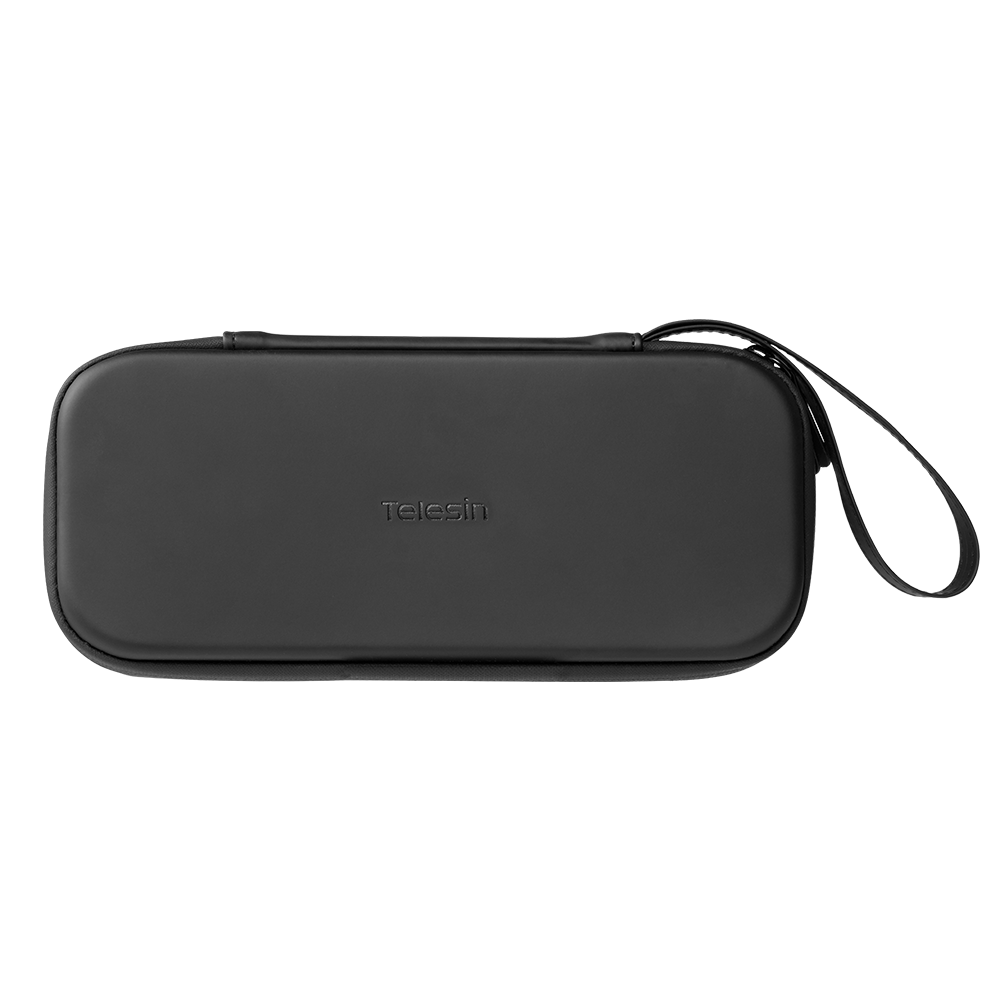
The TELESIN Gimbal Camera Carrying Case uses a three-layer composite shell with a soft nylon lining.
It is designed to protect the camera from common travel risks such as surface contact, pressure inside a bag, and repeated small knocks. At approximately 145g, it adds protection without turning the setup into a bulky hard case.
The built-in wrist strap also makes the case easier to carry between nearby locations.
No compact case can guarantee protection from every drop or impact, but it is far safer than leaving the camera loose in a crowded backpack.
Add a Screen Protector for Everyday Handling
A tempered-glass screen protector adds a replaceable layer over one of the most frequently touched parts of the camera.
It is particularly useful for people who:
- keep the camera in a pocket or small bag;
- film around sand, dust, or rough outdoor surfaces;
- share the camera with other users;
- regularly place it on tables and walls;
- carry multiple accessories in the same compartment.
It will not make the screen unbreakable, but it can reduce the effect of everyday scratches and wear.
Choose a Strap That Matches How You Carry the Camera
A wrist strap works well when the camera is already in your hand and you want extra security while walking or filming.
A quick-release strap makes more sense when you frequently switch between carrying and recording.
A case is better for longer periods of storage or transport.
Many travel creators use a combination: the case inside the main bag, then a wrist or quick-release strap once filming begins.
Build the Right Pocket 4P Kit for Your Content
Instead of buying a general accessory bundle, choose a setup based on what you actually create.
Essential Starter Kit
Best for new Pocket 4P owners and casual creators.
Quick-Release Tripod
Carrying Case
Screen Protector
Wrist Strap
This setup covers basic protection, safer handling, and stable solo filming without adding much weight.
All-Day Travel Vlogging Kit
Best for travel days, walking tours, outdoor attractions, and YouTube vlogs.
Battery Handle
Quick-Release Tripod
VND and CPL filters
Carrying Case
Quick-Release Strap
This combination handles the most common travel problems: running out of power, finding a stable camera position, dealing with outdoor light, and keeping the camera easy to reach.
Lifestyle and Social Creator Kit
Best for Reels, TikTok, fashion, food, cafés, and daily lifestyle content.
Cool Rose Filter
Dual Mini Fill Light Set
Quick-Release Tripod
Wrist Strap
Carrying Case
The tripod supports solo filming, the lights help indoors and at night, and the creative filter adds an optional visual style for portrait-focused content.
Lightweight Cinematic Creator Kit
Best for short films, visual travel stories, behind-the-scenes footage, and small creator teams.
VND, CPL, and Cool Rose Filter Kit
Battery Handle
Magnetic Expansion Mount
Multi-Functional Frame
Dual Mini Fill Light Set
Quick-Release Tripod
This is the most flexible setup, but there is no need to keep every accessory attached.
Use the battery handle and VND for long outdoor sequences. Add lights and a frame for controlled scenes. Switch to the magnetic mount or tripod when the composition needs a different angle.
The Pocket 4P should still feel like a compact camera, even when the setup becomes more capable.
Which DJI Osmo Pocket 4P Accessories Should You Buy First?
When several products look useful, break the decision into stages.
Start with Protection and Support
Begin with:
- a carrying case;
- a screen protector;
- a quick-release tripod;
- a wrist strap.
These are useful for almost every shooting style and solve everyday problems from the first day.
Add Power and Filters Next
Consider:
- a battery handle;
- a VND filter;
- a CPL filter or complete filter kit.
These become more valuable as your shoots get longer and you spend more time outdoors.
Add Mounts and Lighting When You Need Them
Wait until a specific problem appears before adding:
- a magnetic mount;
- a backpack mount;
- an expansion frame;
- compact fill lights;
- a creative filter.
When you repeatedly think, “I need a way to place the camera here,” or “My face is always too dark in this setting,” the next accessory choice becomes obvious.
Check Accessory Compatibility Before You Buy
Some Pocket accessories work across several generations, while others are shaped for one specific model.
Do not assume that a Pocket 3 or Pocket 4 filter, case, or frame will automatically fit the Pocket 4P.
Why Compatibility Varies
Differences in compatibility may come from:
- camera body dimensions;
- lens and filter shape;
- mounting points;
- gimbal clearance;
- screen position;
- connector design.
Accessories using a standard 1/4-inch thread may work with several devices. Close-fitting products such as filters, cases, and frames are more likely to be model-specific.
What to Check Before Ordering
Review:
The exact models listed in the product title.
The compatibility details on the individual product page.
The mounting connection.
Whether the accessory leaves enough room for the gimbal to move.
Whether it can be used with the other parts of your setup.
Whether an additional adapter or frame is required.
The TELESIN Battery Handle and 65cm Quick-Release Tripod are listed for multiple Pocket models, while filters and other close-fitting accessories may have narrower compatibility.
Always rely on the individual product listing before placing an order.
Final Thoughts
The best DJI Osmo Pocket 4P accessories are not the ones that make the camera look more professional. They are the ones that make it easier to keep filming.
For a new owner, that may be a case, screen protector, wrist strap, and compact tripod.
For a travel vlogger, it may be a TELESIN Battery Handle, a filter kit, and a quick-access strap.
For a lifestyle or cinematic creator, a fill light, expansion frame, magnetic mount, or creative filter may be the next useful addition.
Keep the setup light. Add gear when it solves a real problem. Remove it when it does not help the shot.
TELESIN accessories are designed around that kind of practical workflow—durable, easy to use, and built to help creators spend less time managing equipment and more time capturing the story.

