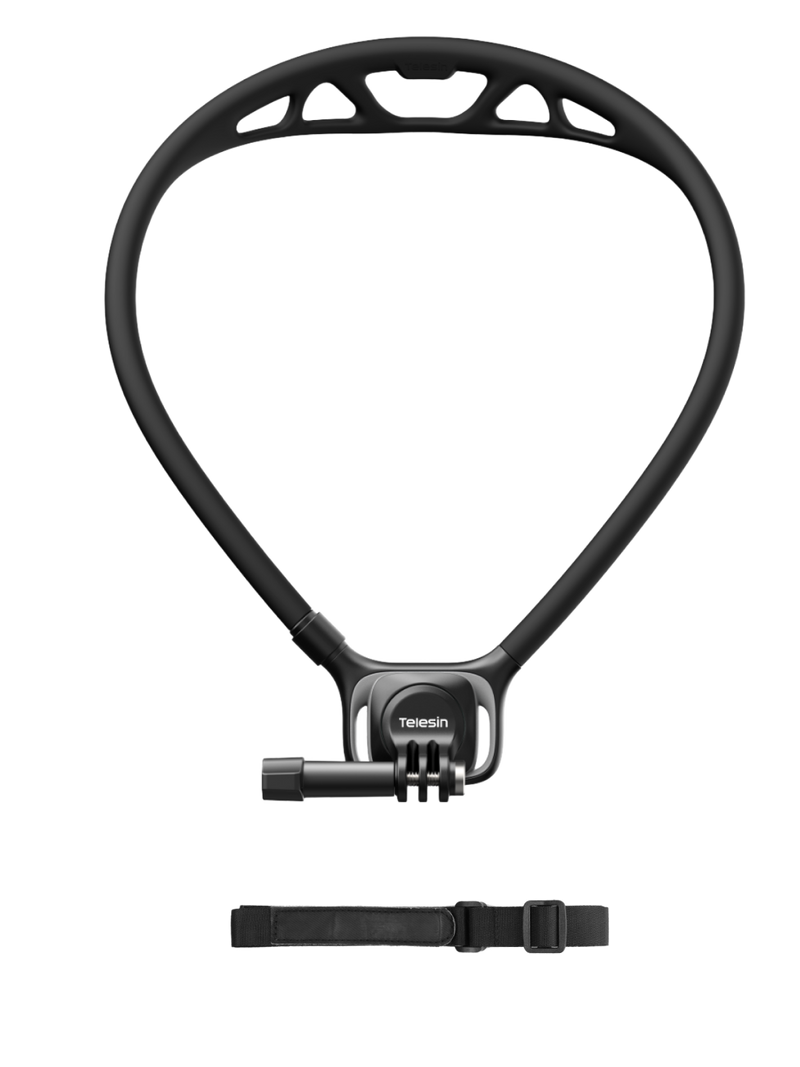
Most neck mount guides focus on specs, compatibility, and camera angles, but overlook a question that matters just as much: how does it feel after an hour of wearing one? Comfort depends on more than weight alone. Pressure points, fit, and movement can all affect whether a mount feels practical for a short clip or a full day of filming. In this guide, we compare neck mounts for both action cameras and smartphones, focusing on what makes them comfortable for longer sessions and which designs suit different shooting habits.
What Is a Neck Mount—and Who Actually Needs One?
A neck mount holds a camera or phone around your collarbone, letting you record hands-free without wearing a head strap or chest harness. Its lower, forward-facing position can provide a natural, eye-level perspective while leaving your hands free for cooking, walking, playing with kids, or demonstrating a product. It’s useful for casual vlogging, running and cycling POV footage, family activities, and livestreams where holding a camera would get in the way.
For Action Camera Shooters (GoPro / DJI Osmo Action / Insta360)
Action cameras are a natural fit for neck mounts because they’re generally compact and lightweight. Whether you’re recording a bike ride, capturing a trail run, or filming a hands-on activity, a neck mount keeps the camera ready without taking up your hands. Fit and bounce control still matter, especially during high-impact movement. For a closer look at mounting options and setup tips, read our
complete guide to action camera neck mounts.
For Smartphone Filmmakers (iPhone & Android)
Neck mounts aren’t just for action cameras. A compatible phone mount can also help you record tutorials, daily activities, travel clips, or hands-free video calls. The key is choosing a design that securely supports your phone and case without feeling bulky around your neck. If you’re looking for a phone-focused option, browse our
neck phone holders.
What Decides All-Day Comfort (Most Guides Skip This)
All-day comfort isn’t guesswork. Four factors can help you judge whether a neck mount will feel comfortable beyond a few minutes: load balance, contact materials, adjustability, and bounce control.
Load Balance: Camera Weight vs. Neck Fatigue
A heavy camera isn’t the only concern. The mount’s own weight and how far the camera hangs from your body also affect the load on your neck and collarbone. Instead of relying on a universal weight limit, consider the combined weight of the camera and mount, then look for a design that spreads contact across a wider area rather than concentrating pressure at one point.
Strap Width, Padding, and Skin-Friendly Materials
If a mount leaves pressure marks, rubs against your skin, or feels hot in warm weather, its contact design may be the problem. Look for smooth edges, comfortable padding, and materials that suit your climate and skin sensitivity. Breathable fabric may feel cooler during summer use, while soft padding can help reduce localized pressure.
Adjustability for Different Body Types and Layers
A fit that feels right over a T-shirt may become uncomfortable over a jacket or beneath a backpack strap. Choose a mount with enough adjustment to accommodate different clothing layers, and check whether you can reposition it easily without creating uneven pressure.
Bounce Control: Why Wobble Ruins Long Shoots
Excessive movement can make footage shaky and cause the mount to rub repeatedly against your collarbone. A curved design that sits close to your torso may help limit swinging, although the result also depends on camera weight, fit, and activity. Before buying, check how securely the camera sits and whether the mount stays in place as you move.
Neck Mount Comfort: Quick Checklist
| What to check |
Possible warning sign |
How to evaluate it |
| Load balance |
Pressure concentrated on one spot |
Consider the combined weight and how far the camera hangs from your body |
| Contact materials |
Rubbing, pressure marks, trapped heat |
Check padding, edge finishing, and breathability |
| Adjustability |
Fit changes with clothing or backpack straps |
Look for a practical adjustment range and easy repositioning |
| Bounce control |
Camera swings or mount rubs while walking |
Check how closely the mount fits your torso and how securely it holds the camera |
Quick Release vs. Fixed Mounts: Which Workflow Are You In?
The main advantage of a quick-release neck mount is convenience, not automatically better stability. If you switch between filming and everyday activities throughout the day, a quick-release system makes it easier to remove your camera during breaks, pack it away, and get ready for the next shot. It’s especially useful for travel, commuting, and casual vlogging.
A fixed mount takes a simpler approach. With fewer release components to manage, it may offer a lighter setup and fewer steps between shots, making it practical for longer recording sessions, event coverage, or hands-free livestreaming. Actual stability depends on the mount’s design, fit, and camera weight, so neither system is inherently more stable in every situation.
Before choosing, ask yourself: How often will I take the camera on and off? If you expect to remove it five or more times a day, quick release may be worth the added cost and complexity. If you mostly start recording once and keep going, a fixed design may be all you need.
Quick-release systems vary in how they lock, release, and manage camera weight. Telesin’s SE 3 Flagship uses a magnetic attachment with a twist-to-lock mechanism, combining convenient attachment with an additional locking step. Align the mount, twist it into the locked position, and pull gently to check that it is secure before filming. The best choice is the one that fits your routine without adding unnecessary steps or bulk.
Neck Mount Styles Compared: Hanging vs. Magnetic vs. U-Shape
Neck mounts come in different designs, and the best choice depends on what you attach, how often you remove it, and how much movement you expect. A hanging mount offers a straightforward way to position a camera in front of your chest, while magnetic designs prioritize quick attachment and U-shaped holders focus on supporting different devices. Use the comparison below to narrow down your options.
| Mount style |
Stability |
Long-wear comfort |
Best for |
| Hanging neck mount |
Depends on fit, locking mechanism, and camera weight |
A well-fitted design with a comfortable contact area can spread pressure |
Action camera users and hands-free POV recording |
| Magnetic neck mount |
Depends on magnetic strength, alignment, and device weight |
Convenient for frequent attachment and removal, though the full setup can feel bulky |
Compatible smartphones and quick, casual filming |
| Universal U-shaped holder |
Depends on how securely the device sits in the holder |
Open construction may improve airflow, but fit can vary by body shape |
Users who switch between devices or use different camera setups |
Hanging Neck Mounts
Hanging mounts suspend the camera from a neck-worn frame, offering a simple setup for hands-free recording. Their straightforward design can suit action cameras and everyday POV footage, provided the mount fits securely and distributes pressure comfortably. The Telesin Neck Holder SE 3 is worth considering if you want a dedicated neck-worn setup; its Flagship version adds adjustable positioning and a magnetic quick-release mechanism. For longer sessions, pay attention to how the frame rests against your collarbone and whether the camera swings as you walk.