


Yes, you can shoot professional-looking videos with a smartphone.
Modern phones can record sharp 4K footage, smooth slow motion, and surprisingly detailed outdoor scenes. But good video rarely comes from the camera alone. A phone can have excellent specs and still produce footage that feels shaky, flat, or poorly lit.
For hikers, cyclists, campers, skiers, and outdoor creators, the biggest improvements usually come from four areas: camera control, lighting, settings, and shot planning.
A secure phone grip helps you handle the camera more naturally. A compact fill light helps when the subject is lost in shadow. Combined with a few practical filming habits, these tools can turn a casual phone clip into something far more polished.
What Makes Smartphone Video Look Professional?
Viewers do not care which phone you used if the footage is hard to watch.
They notice whether the movement feels controlled, whether the subject is easy to see, and whether the shots fit together into a clear story.
Controlled Camera Movement
Outdoor footage should feel alive, but it should not feel accidental.
Before recording, decide what the camera is supposed to do. You might follow a runner for a few steps, reveal a mountain view, or hold a close-up of someone preparing their gear.
Once you choose the movement, keep it simple.
Hold the phone close to your body, move more slowly than feels necessary, and avoid constantly correcting the framing. If you are walking, bend your knees slightly and keep your steps short.
A smartphone grip makes this easier by giving your hand a more natural place to hold the phone. Instead of pinching the edges of a flat device, you can guide the camera with more confidence.
Consistent Focus and Exposure
Outdoor light changes quickly.
A skier can move from bright snow into shade in seconds. A cyclist may pass through patches of sun and forest. A person standing in front of a sunset may look much darker on camera than they do to your eyes.
When possible, lock focus and exposure before recording. This prevents the phone from constantly changing brightness or searching for focus in the middle of the shot.
For planned action, set the frame first and let the subject move through it. This often looks cleaner than trying to chase the subject with the camera.
Balanced Lighting
Outdoor filming does not always mean good lighting.
A cap, helmet, or hood can cast deep shadows across the face. A bright sky can make the subject look like a silhouette. Inside a tent or vehicle, the scene may look fine to your eyes but too dark for the phone camera.
A small fill light helps bring detail back into the subject without changing the mood of the scene.
It is especially useful for:
- Sunset interviews
- Campsite videos
- Gear demonstrations
- Inside-tent footage
- Nighttime equipment shots
- Cloudy-day portraits
The light should support the scene, not dominate it. Start low and increase the brightness only until the face or product looks clear.
Strong Composition
A polished outdoor video usually combines different types of shots.
Use wide shots to show the location, medium shots to show the activity, and close-ups to capture details such as gloves, boots, bike components, or climbing equipment.
Reaction shots also matter. A short clip of someone catching their breath, laughing after a run, or looking back at the route often adds more personality than another action shot.

What Are the Limits of Smartphone Video?
A phone can handle a lot, but it still has physical limitations.
Knowing where it struggles will help you make better decisions.
Low-Light Performance
Smartphone sensors are small compared with those in professional cameras. In darker conditions, footage may show noise, soft detail, or blown highlights.
A portable fill light will not change the sensor, but it can reduce the amount of work the phone has to do. Lighting the subject properly often gives a cleaner result than trying to fix dark footage later.
Awkward Handling
Phones are designed to be slim, not easy to hold like cameras.
That becomes obvious when filming horizontally, moving outdoors, or wearing gloves. A thin phone can feel slippery, and touching the screen while recording may shift the frame.
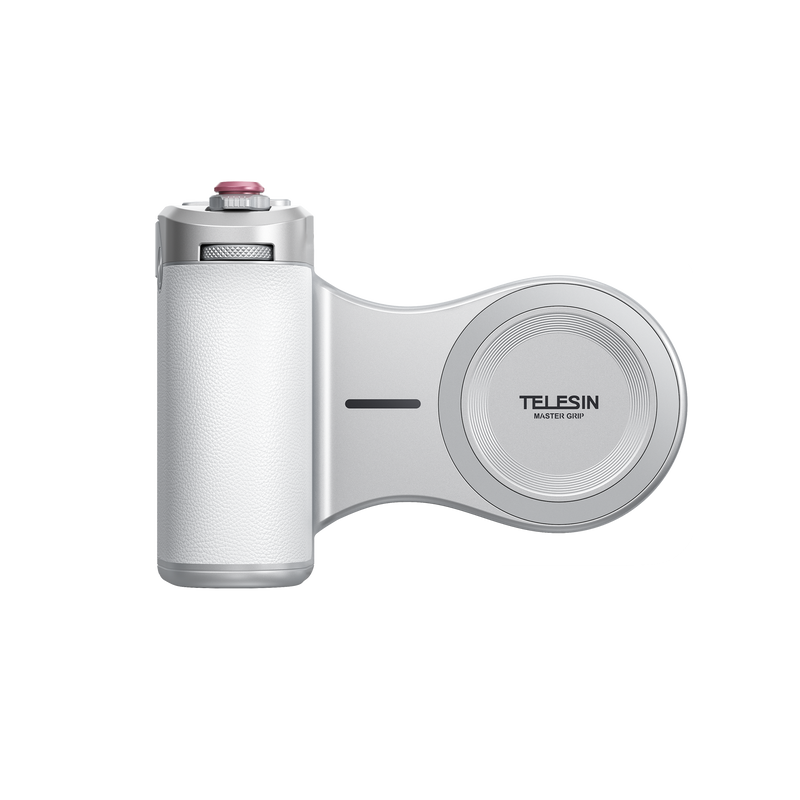
The TELESIN Magnetic Grip For Phone gives the device a more camera-like feel. Its finger-hook design offers a more secure hold, while the shutter and zoom controls reduce the need to reach across the screen.
This is particularly useful when you need to start recording quickly, adjust framing, or capture short handheld shots without setting up a larger rig.
Battery, Storage, and Weather
Outdoor filming can drain a phone faster than expected.
High-resolution video, bright screens, cold weather, and long recording sessions all reduce battery life. Storage can disappear quickly as well, especially when shooting in 4K or at high frame rates.
Before heading out:
- Clear enough storage
- Carry a compact power bank
- Bring a clean lens cloth
- Keep the phone protected from rain, sand, and snow
- Move it out of direct sun between takes
- Check all mounts and accessories
Also, clean the lens regularly. Fingerprints, sunscreen, dust, and water droplets can make a good phone camera look surprisingly poor.

Best Smartphone Settings for Outdoor Video
There is no single setting that works for every situation, but a few choices cover most outdoor filming needs.
Resolution
Use 4K when you want more detail or room to crop during editing.
Use 1080p when you want smaller files, longer recording time, and faster uploads.
A stable, well-exposed 1080p clip will usually look better than a shaky 4K clip.
Frame Rate
Use:
- 24 fps for cinematic landscapes and interviews
- 30 fps for general outdoor content
- 60 fps for cycling, skiing, running, or fast action
- 120 fps or higher for short slow-motion moments in bright light
Higher frame rates need more light. Avoid using extreme slow motion late in the day unless the scene is still well lit.
Focus and Exposure
Before an important shot, frame the subject, choose the resolution and frame rate, then lock focus and exposure if your camera app allows it.
Record a short test and review it before the action starts. A few seconds of checking can save an entire sequence.
Digital Zoom
Try not to rely on digital zoom.
It reduces detail and makes camera shake more obvious. Move closer when it is safe, choose a better shooting position, or use the phone’s native lenses.
Never take unnecessary risks just to improve the framing.
How to Keep Smartphone Footage Stable Outdoors
Software stabilization helps, but it cannot fix every movement.
Good handheld footage starts with how you hold the phone.
Improve Your Technique
Use both hands when possible and keep your elbows close to your body.
When walking, shorten your steps and keep your shoulders level. Start and end each movement slowly, then hold the frame still for a moment before stopping the recording.
These small pauses make the footage easier to edit.
Use a Smartphone Grip
A phone grip gives you more direct control over the camera.
The TELESIN Magnetic Grip For Phone creates a clearer contact point than the flat edges of a bare smartphone. It is useful for trail updates, campsite videos, product close-ups, and short following shots in safe conditions.
It also suits creators who want to keep their setup light. A gimbal can produce smoother motion, but it adds weight, charging, and setup time.
For short outdoor clips, a grip is often the more practical choice.
Grip or Gimbal?
Choose a grip when you want fast setup, low weight, and simple handheld control.
Choose a gimbal when you need long tracking shots, motorized stabilization, or more complex movement.
One is not automatically better than the other. The right choice depends on the shot.
How to Use a Fill Light Outdoors
A fill light is most useful when the subject is darker than the background.
This often happens at sunset, under trees, beneath a helmet, or inside a tent.
Keep the Light Natural
Place the light slightly above eye level and a little to one side of the camera when possible.
Start with low brightness. Increase it only until the subject is clear.
A warmer light can work well at sunset or around camp. A more neutral setting usually suits cloudy daylight or product shots.
Add the TELESIN Fill Light
The TELESIN Mobile Phone Magnetic Ice Cube Light offers a compact way to improve outdoor lighting without carrying a large setup.
It supports adjustable brightness, a 2500–9000K color-temperature range, and RGB lighting for more creative scenes. Its magnetic design also makes it easy to use with a mobile filming setup.
It works well for:
- Sunset trail updates
- Campsite interviews
- Nighttime gear demonstrations
- Vertical social videos
- Product close-ups
- Inside-tent content
For interviews or tutorials, stick to natural white light. Use RGB modes more selectively for mood, background color, or creative detail shots.
A Lightweight TELESIN Setup for Outdoor Filming
A useful outdoor filming kit does not need to fill a backpack.
A simple setup may include:
- Smartphone
- TELESIN Magnetic Grip For Phone
- TELESIN Mobile Phone Magnetic Ice Cube Light
- Compact power bank
- Lens cloth
- Small microphone
- Protective pouch
The Grip improves how the phone feels in your hand. The Fill Light helps when the natural light becomes difficult.
Together, they cover two of the most common problems in smartphone videography: unstable handling and poor subject lighting.
This setup suits solo creators, hikers, campers, travel vloggers, cyclists, skiers, and outdoor brands that need quick social content without a heavy production kit.
How to Film Extreme Sports Safely
Good footage is never worth putting yourself or someone else at risk.
Do Not Film Handheld During High-Risk Movement
Do not hold a phone while actively cycling, skiing, climbing, driving, or doing anything that requires both hands and full attention.
Use the Grip before or after the activity, or film from a safe position.
For first-person action, use equipment designed for hands-free mounting and check that it is suitable for the activity.
Plan the Shot First
Choose the camera position before the action begins.
Set the frame, confirm where the athlete will move, check the phone and accessories, and record a low-speed test if possible.
A planned static shot often looks better than a rushed handheld attempt.
Check Every Connection
Magnetic accessories are convenient, but they still need to be checked.
Make sure:
- The phone or case is compatible
- Magnetic surfaces are clean
- The accessory is correctly aligned
- Nothing blocks the lens
- Loose cables are secured
- A safety tether is used where appropriate
Strong vibration, impact, or incorrect positioning can reduce holding strength.
A Simple Outdoor Shot List
A short shot list will make the final edit feel much more complete.
Establishing Shots
Show the landscape, weather, trail, campsite, or starting point.
Action Shots
Let the subject move through a planned frame instead of following every second of the action.
Detail Shots
Film hands, boots, equipment, bike parts, snow, water, or gear preparation.
Reaction Shots
Capture a quick comment, laugh, pause, or post-activity reaction.
Closing Shots
End with packed equipment, sunset, the empty trail, or a short final reflection.
Common Smartphone Video Mistakes
Recording Clips That Are Too Long
Short, intentional clips are easier to watch and edit.
Using Too Much Digital Zoom
Choose a better position or crop lightly during editing.
Ignoring Harsh Shadows
Move the subject, change the angle, or add subtle fill light.
Moving the Phone Too Quickly
Slow down and pause briefly at the beginning and end of each shot.
Overusing Slow Motion
Use it for one strong moment rather than the entire sequence.
Forgetting the Final Platform
Film vertically for TikTok, Reels, and Shorts. Film horizontally for standard YouTube videos and longer edits.
Is a Smartphone Enough for Professional Outdoor Video?
For many projects, yes.
A smartphone is more than capable of producing travel videos, outdoor vlogs, social campaigns, product demonstrations, short interviews, and action-sports highlights.
A professional camera may still be the better choice for very low light, long-distance work, complex commercial productions, or projects that require advanced lenses and audio.
The better question is whether the setup can deliver the result you need.
When the answer is yes, the phone is already a professional tool.
Final Thoughts
You do not need a full camera bag to create strong outdoor video.
A smartphone, a clear plan, and a few well-chosen accessories can cover a surprising range of situations.
The TELESIN Magnetic Grip For Phone gives you a more secure, camera-like way to handle your device. The TELESIN Mobile Phone Magnetic Ice Cube Light helps keep faces, products, and details visible when natural light falls short.
For creators who care about portability, speed, and flexibility, that combination makes a lot of sense.
Carry less. Shoot with more control. Stay ready when the moment appears.

